FreshBooks is precise about bank transaction imports in a way that catches people out. There is one accepted format, CSV, and it needs particular columns in it. Not OFX, not QFX, not QIF, and not the PDF your bank sent you. If your file has the wrong columns, the wrong date layout, the wrong encoding, or more than five hundred rows, the import will refuse it or, worse, accept it and put things in the wrong place.
None of that is unreasonable, it is just exact. The trouble is that no bank exports a CSV shaped the way FreshBooks wants. Bank CSVs come with reference numbers, running balances, separate debit and credit columns, and headers three rows down. FreshBooks wants Date, Amount, and Description for bank reconciliation, or Date, Amount, Category, Description, and Merchant for expenses, and it wants them clean.
Ledger Tome lets you build the CSV to those requirements directly: pick the columns, pick the date format, and export. This page covers exactly what FreshBooks needs, how to handle the five hundred row limit, and which of the two import paths you actually want.
What FreshBooks Requires
One format, specific columns, and two rules that catch most people:
CSV only
FreshBooks imports bank transactions from CSV. There is no OFX, QFX, or QIF path, and no PDF import.
Specific columns
Bank reconciliation wants Date, Amount, and Description. Expenses want Date, Amount, Category, Description, and Merchant. Different paths, different requirements.
500 transactions per file
A hard cap. A busy account's year will exceed it, so long periods have to be split into several files.
Consistent dates, UTF-8
Mixing MM/DD/YYYY and DD/MM/YYYY in one file causes silent mismatches, and the file needs UTF-8 encoding.
The requirements are clear. What's missing is a bank that exports a file matching them, which is the gap this conversion closes.
Works With Your Bank, Whatever It Exports
Ledger Tome reads PDF statements and CSV/Excel exports from:
US Banks
Chase, Bank of America, Wells Fargo, Citi, Capital One, US Bank, PNC, and hundreds of credit unions
Canadian Banks
RBC, Scotiabank, BMO, CIBC, Tangerine
UK Banks
HSBC, Barclays, Lloyds, NatWest, Monzo, Starling
Don't see the bank? The AI adapts to any statement layout automatically, then you decide what the output CSV looks like.
Building a CSV FreshBooks Will Accept
For bank reconciliation
FreshBooks needs Date, Amount, and Description. Amount should be a single signed column, negative for money out, rather than separate debit and credit columns. Set the layout to exactly those three fields and nothing else.
For expenses
FreshBooks needs Date, Amount, Category, Description, and Merchant. Ledger Tome produces the transaction fields; category and merchant are business classifications rather than statement data, so expect to add or adjust those.
Bank CSVs almost never arrive in either shape. They carry reference numbers, running balances, separate debit and credit columns, and often a header block above the data. Ledger Tome lets you set the output column layout directly, so instead of deleting columns in Excel after every download, you choose Date, Amount, and Description once and every export comes out that way.
Set the date format explicitly rather than accepting whatever the source used. FreshBooks is unforgiving about mixed layouts within a file, and a bank export that switches format partway through, which does happen, will produce mismatches that are hard to trace. Choosing one layout at export removes the possibility entirely.
FreshBooks caps imports at 500 transactions per file. Ledger Tome does not split exports automatically, so for a busy account convert and import statement by statement, usually month by month, rather than assembling a year into one file. That keeps every file well under the cap and has the side benefit of making it obvious which period any problem came from.
Format deep dives: Bank Statement to CSV and Credit Card Statement to CSV .
How to Import the File Into FreshBooks, Step by Step
Bank reconciliation import:
- Open the Accounting or Banking area and find the bank reconciliation section
- Choose the option to import transactions from a file
- Upload the CSV from Ledger Tome, with Date, Amount, and Description columns
- Confirm the column mapping and review the imported transactions
Expenses import:
- Open the Expenses area and choose the import option
- Upload a CSV containing Date, Amount, Category, Description, and Merchant
- Confirm the mapping, adding categories where needed
- Review the imported expenses
Import oldest first, one statement per file, and keep each file under 500 rows. If a month alone exceeds that, split it in half by date; there is no penalty for importing several files into the same period.
How Ledger Tome Prepares Statements for FreshBooks
Ledger Tome turns PDF bank and credit card statements, CSVs, and Excel exports into a CSV shaped the way FreshBooks requires.
Upload
Upload the PDF statement or spreadsheet export
AI Extraction
Statement structure, columns, dates, and debit/credit logic detected automatically, including on scanned statements
Review & Set Layout
Check every transaction, then choose the output columns and date format
Download CSV
A file built to FreshBooks' requirements
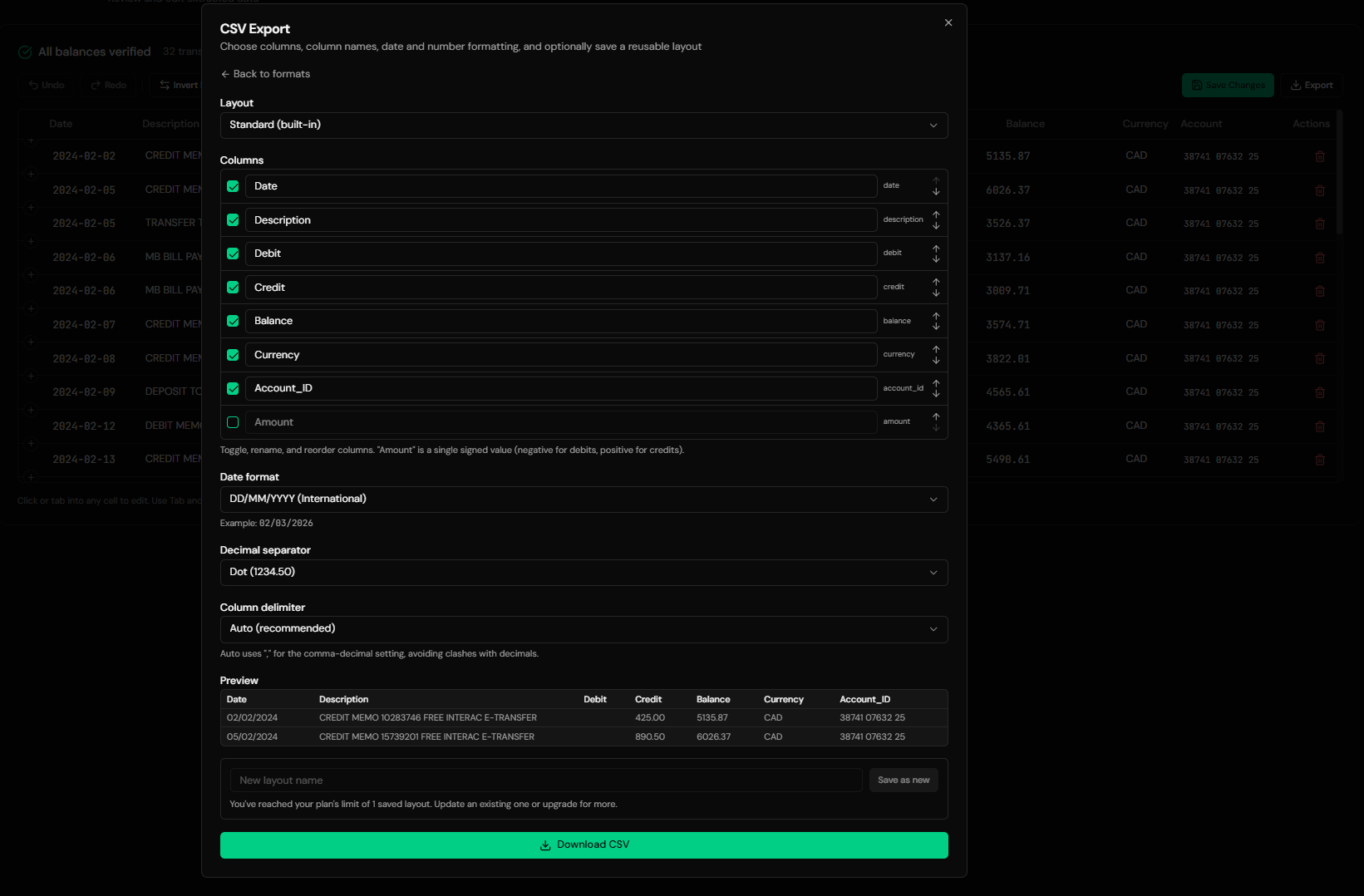
The output column layout is configurable, so you can produce exactly Date, Amount, and Description with a single signed amount column rather than the separate debit and credit columns most banks export. The date format, decimal separator, and delimiter are all set explicitly, which is what keeps a FreshBooks import from silently misreading a date.
From Bank PDF to a CSV FreshBooks Accepts
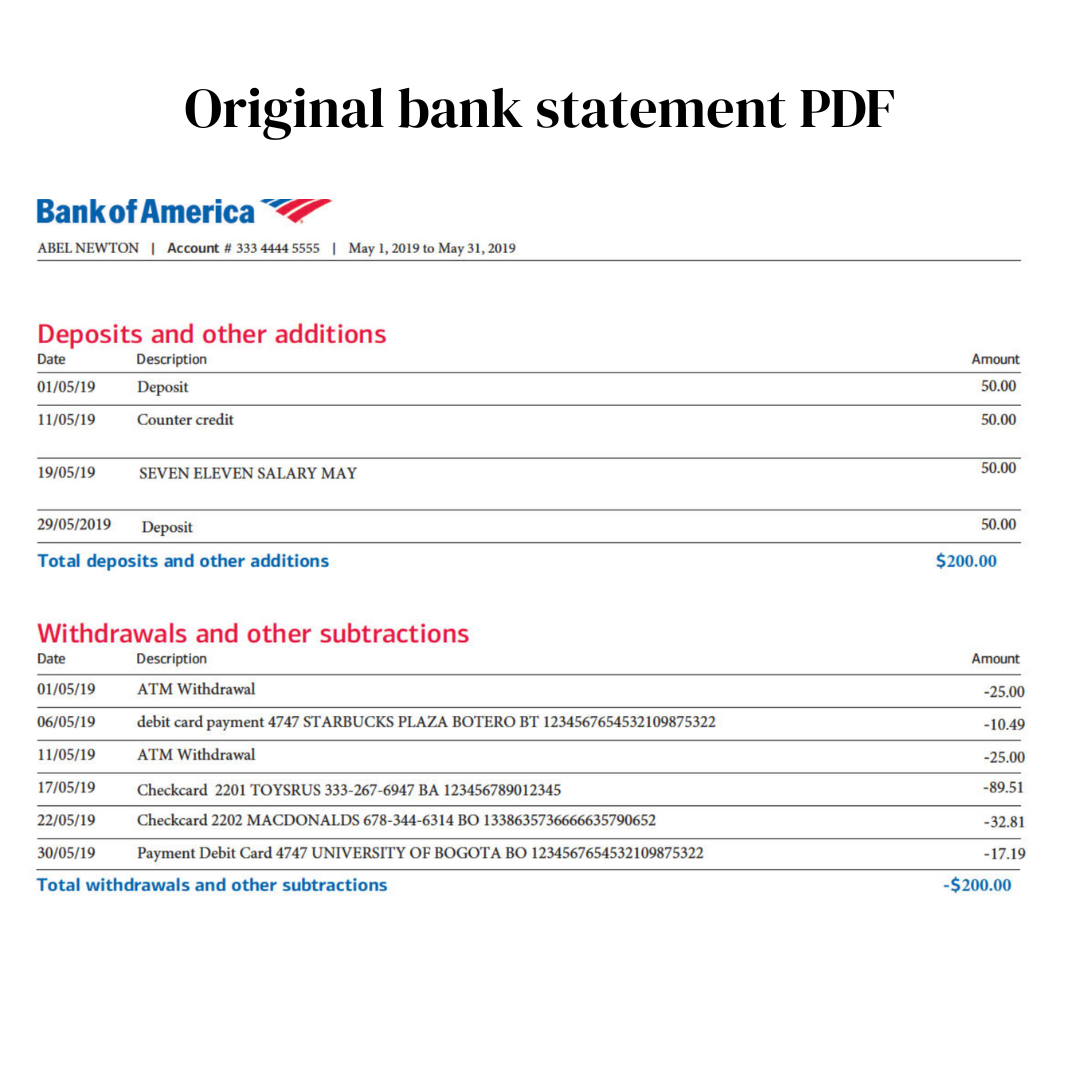
Before: the bank's PDF statement
After: Date, Amount, Description
Use Cases
Bank Reconciliation
Getting the transactions in so the reconciliation can actually be done.
A Connection That Missed Transactions
Filling gaps the bank feed did not pick up.
Banks FreshBooks Can't Connect To
Smaller banks and credit unions where import is the only route.
Catching Up Before Tax Time
A year of statements, converted month by month.
Credit Card and Business Card Accounts
Card statements with the signs the right way around.
Expense Backfill
Building the expenses import with categories added.
Who It's For
Freelancers on FreshBooks
Invoicing-led businesses that still need the bank side reconciled.
Consultants & Agencies
Small service businesses doing their own books.
Contractors
Tracking income and expenses across a few accounts.
Bookkeepers With FreshBooks Clients
Where the CSV requirements come up every month.
Anyone With an Unsupported Bank
Where connections were never an option.
People Catching Up at Deadline
The most common reason anyone searches this.
Related Converters
Ledger Tome supports multiple formats and destinations. Choose the one that fits your workflow:
The format-first page for PDF statements.
Card statements specifically.
When you want to review in a spreadsheet first.
The Wave equivalent of this guide.
If you are considering moving.
What Ledger Tome Does Not Do
For clarity and transparency, Ledger Tome does not:
- Access bank accounts directly
- Initiate or modify transactions
- File taxes or submit reports
- Replace accounting software
- Categorize transactions automatically
It focuses solely on converting statement data into structured, accounting-ready formats.
Security & Privacy
Your Financial Data is Protected
We take statement security seriously. Here's how we protect your data:
-
Encrypted Transmission
All uploads use 256-bit SSL encryption (the same security banks use)
-
Secure Processing
Files are processed in isolated, secure environments with no human access
-
Automatic Deletion
All uploaded files are permanently deleted after 7 days (or immediately upon request)
-
No Training Data
Your statements are never used to train AI models or shared with third parties
-
No Account Access
We never access your bank account directly or store your banking credentials
-
GDPR Compliant
Full compliance with data protection regulations
-
No Permanent Storage
We don't maintain a database of your financial information
Privacy First: We process your data solely for conversion purposes. No marketing, no data selling, no third-party sharing.
Frequently Asked Questions
How do I import bank transactions into FreshBooks?
Can FreshBooks import OFX or QFX files?
Can FreshBooks read PDF bank statements?
What columns does FreshBooks need?
What's the transaction limit?
My file has separate debit and credit columns.
Which date format should I use?
Does this work for credit card statements?
Does the file need to be UTF-8?
Should I use the bank import or the expenses import?
How far back can I import?
How much does it cost?
Troubleshooting Common Issues
FreshBooks rejected the file
Check the row count is under 500 and that the columns match the import path you chose. Bank reconciliation and expenses require different fields.
Dates imported wrong
A DD/MM versus MM/DD issue, or a source file that mixed both. Set the date format explicitly at export so the whole file uses one layout.
Amounts in the wrong direction
FreshBooks expects a signed amount, negative for money out. Use the amount column in the output layout rather than separate debit and credit columns.
Only part of the statement imported
Almost certainly the 500 transaction cap. Split the period and import in several files.
Special characters look wrong
An encoding issue. Ledger Tome exports UTF-8; if the file was opened and re-saved in another program, re-download rather than re-saving.
Summary
FreshBooks accepts one format with exact requirements: CSV, specific columns depending on the import path, consistent dates, UTF-8, and no more than 500 transactions per file. No bank exports anything resembling that. Building the CSV to specification at conversion time, rather than reshaping a bank download in Excel afterwards, turns a fiddly monthly job into a single choice you make once.
If you have statements waiting to get into FreshBooks, Ledger Tome builds the CSV in minutes.
Ready to Get Statements Into FreshBooks?
Stop reshaping bank downloads in Excel. Convert your first statement into a CSV FreshBooks accepts, in minutes.
Used by freelancers, consultants, and small businesses on FreshBooks