QFX is Quicken's import format, and that's the whole problem: without Quicken, a .qfx file is a wall of tags nothing on your computer opens. Banks produce them from "download for Quicken" buttons, Quicken users accumulate archives of them, and sooner or later someone needs the transactions in a spreadsheet instead. Our converter reads the file and gives you clean CSV or Excel: one row per transaction, dates, payees, and amounts in columns.
The people searching this conversion usually fall into two camps. Some are Quicken users who want their data where analysis happens: Excel, a budget sheet, a pivot table. Others are leaving Quicken, or never had it, and hold QFX files as the only structured export of their accounts. Both end in the same place: the data unpacked from Intuit's wrapper into columns anyone can use.
This page explains what a QFX file contains, why you can't open one without Quicken, and how to get analysis-ready data out of it.
Why You Can't Open a QFX File Without Quicken
QFX is built for exactly one importer. Everything else struggles:
A format with one customer
QFX exists so Quicken can import bank data. No spreadsheet program, and almost no other software, opens it.
OFX underneath, SGML quirks included
Inside, QFX is OFX 1.x: tagged SGML with unclosed tags that break XML tools and defeat Excel's importers.
Encoded dates and signed amounts
YYYYMMDD date stamps and sign conventions that differ between bank and credit card files need decoding, not guessing.
Split descriptions
Payee and memo live in separate tags, one often truncated. Reading them raw loses half the story.
Your data is in there, complete. It's just wrapped for a program you may not have or may be leaving.
What Is a QFX File?
A QFX file is Quicken's Web Connect format: the OFX standard plus Intuit's identification tags, produced by banks for Quicken import.
You typically end up holding one because your bank's export page offered "Quicken" as a download option, because years of Web Connect imports left an archive on disk, or because someone sent you their Quicken-bound data. The sibling formats carry the same statement: .qbo (QuickBooks) and plain .ofx files differ only in wrapper, and Ledger Tome reads all three.
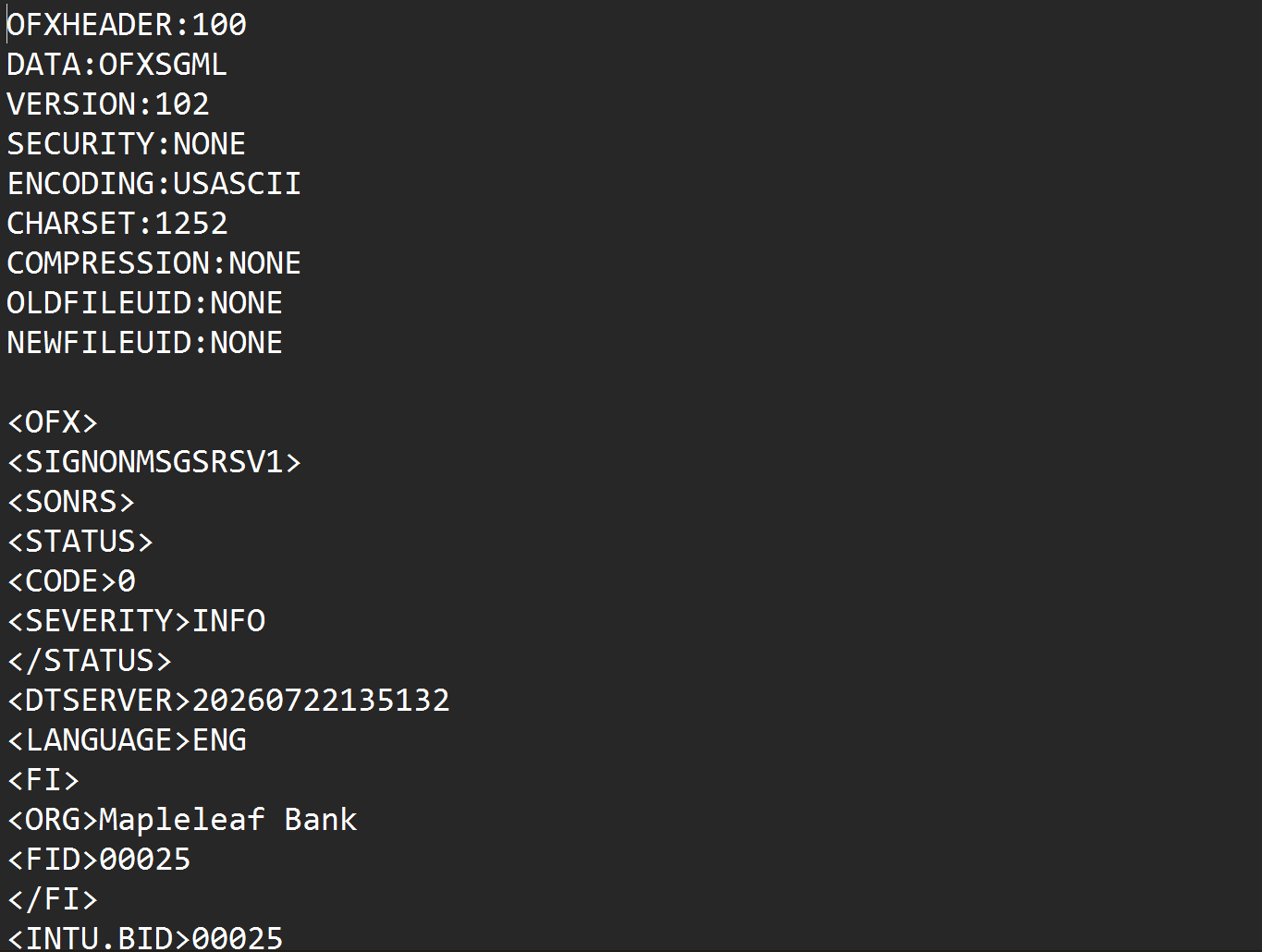
What's inside a QFX file:
OFXHEADER:100
DATA:OFXSGML
VERSION:102

<OFX>
<SIGNONMSGSRSV1><SONRS>
<INTU.BID>02100
</SONRS></SIGNONMSGSRSV1>
<BANKMSGSRSV1><STMTTRNRS><STMTRS>
<CURDEF>USD
<BANKTRANLIST>
<STMTTRN>
<TRNTYPE>DEBIT
<DTPOSTED>20260115
<TRNAMT>-4.50
<FITID>2026011500001
<NAME>Coffee Shop
</STMTTRN>
</BANKTRANLIST>
Going the other direction, into Quicken? See our CSV to QFX and PDF to QFX converters, or the full Quicken import guide .
Common Ways to Read a QFX File
Open It in a Text Editor
Confirms the file type, shows payee fragments between tags. No analysis possible.
Import Into Quicken, Then Export
Works if you have Quicken and want its CSV export's shape. If you're leaving Quicken or never had it, this is a subscription for a file conversion.
Excel's Import Wizards
QFX isn't valid XML and isn't delimited text, so both of Excel's paths produce fragments, not transactions.
Automated QFX Conversion
Parses the Web Connect structure natively, joins split descriptions, decodes credit card signs, and outputs a clean spreadsheet. Free to start.
QFX to CSV: Method Comparison
| Method | Time Required | Accuracy | Best For | Cost |
|---|---|---|---|---|
| Text editor | Instant | Read-only squinting | Confirming file contents | Free |
| Quicken round-trip | 30+ minutes | High, if you own Quicken | Current Quicken subscribers | Subscription |
| Excel import wizards | 30-60 minutes per file | Fails or fragments | Nothing reliable | Free |
| Ledger Tome | Under a minute | Field-faithful | Any QFX, OFX, or QBO file | Free to start |
Why automated conversion wins: the one importer QFX was built for shouldn't be the only way to read your own transactions.
How Ledger Tome Converts QFX to CSV
Ledger Tome parses Web Connect files natively and turns them into clean spreadsheets.
Upload
Upload your .qfx file
Native Parsing
The OFX structure decoded; dates, amounts, and split descriptions normalized
Review & Edit
Check every transaction in an interactive preview before export
Download CSV or Excel
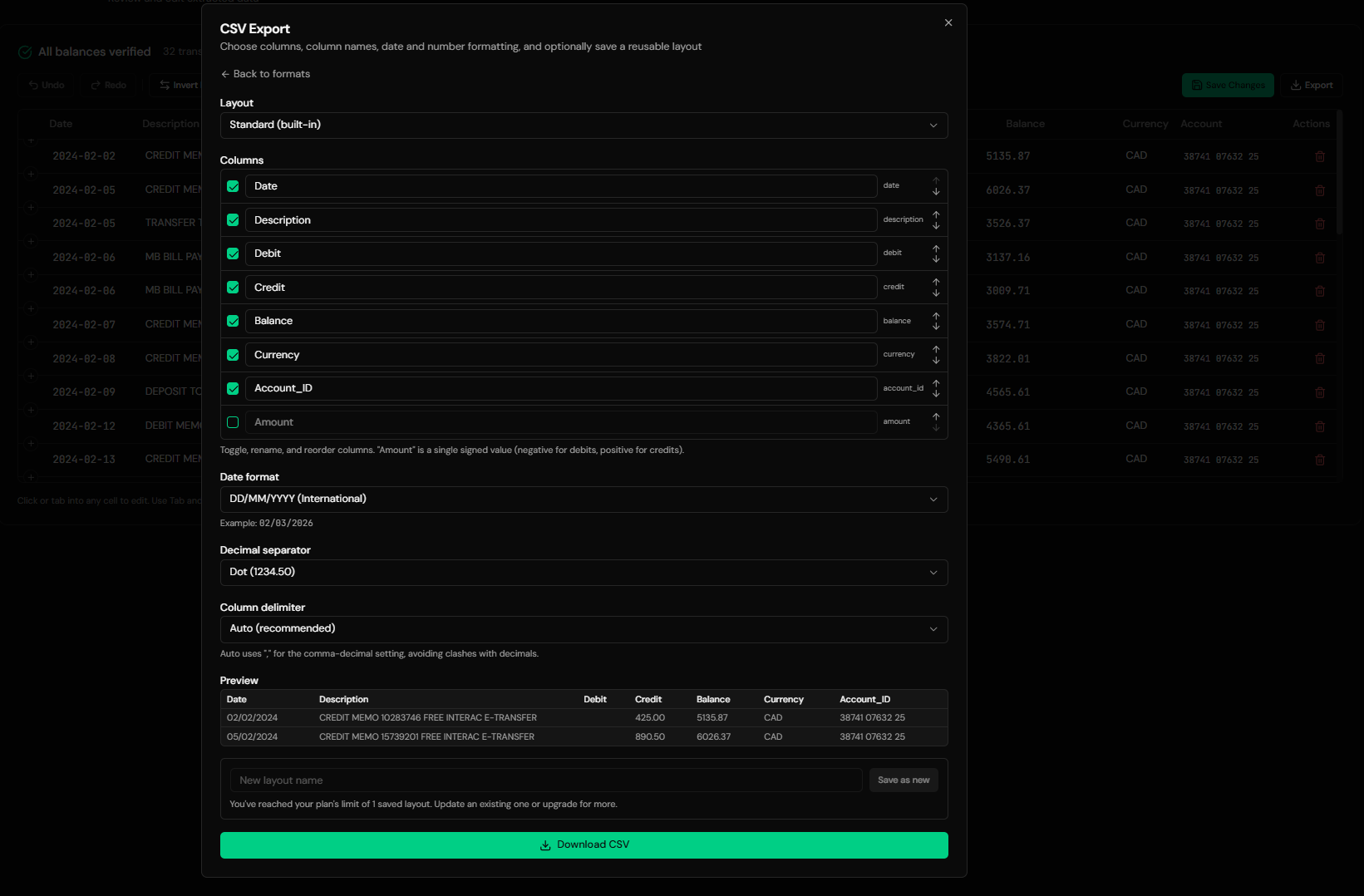
One row per transaction, ready for analysis
Credit card files are recognized and their sign convention decoded, so charges and payments come out the right way around. The statement's ledger balance is preserved as metadata; per-row running balances are not invented, because QFX files don't contain them.
From Web Connect Tags to a Clean Spreadsheet
Before: raw QFX file
After: clean spreadsheet
Use Cases
Analyzing Quicken Data in Excel
Budgets, pivots, and charts on data Quicken keeps in its own world.
Leaving Quicken
Extract account history from Web Connect archives on the way out, without keeping the subscription for it.
The Bank Only Offers "Quicken" Downloads
Some export pages offer QFX as their only structured format. Convert it and move on.
Bookkeepers Receiving QFX Files
Clients send whatever their bank produced; read it without owning Quicken.
Archive Recovery
Years of downloaded .qfx files turned back into usable history.
Just Opening the File
Sometimes you only need to see what's in it. That counts too.
Who It's For
Quicken Users Who Analyze in Excel
The register is fine; the analysis lives in spreadsheets.
People Leaving Quicken
Taking their transaction history with them.
Recipients of Bank QFX Downloads
When "download for Quicken" was the only structured option.
Bookkeepers & Accountants
Reading client Web Connect files without the software.
Developers & Consultants
Inspecting QFX deliveries without writing an OFX parser.
Anyone Handed a .qfx File
If you didn't choose the format, you shouldn't need to buy the software.
Related Converters
Ledger Tome reads and writes many financial formats. Choose the one that fits your workflow:
The generic OFX version of this page.
The other direction: spreadsheet data into Quicken.
PDF statements into Quicken's format.
QuickBooks Web Connect files into spreadsheets.
PDF statements into Excel.
What Ledger Tome Does Not Do
For clarity and transparency, Ledger Tome does not:
- Access bank accounts directly
- Initiate or modify transactions
- File taxes or submit reports
- Replace accounting software
- Categorize transactions automatically
It focuses solely on converting statement data into structured, accounting-ready formats.
Security & Privacy
Your Financial Data is Protected
We take statement security seriously. Here's how we protect your data:
-
Encrypted Transmission
All uploads use 256-bit SSL encryption (the same security banks use)
-
Secure Processing
Files are processed in isolated, secure environments with no human access
-
Automatic Deletion
All uploaded files are permanently deleted after 7 days (or immediately upon request)
-
No Training Data
Your statements are never used to train AI models or shared with third parties
-
No Account Access
We never access your bank account directly or store your banking credentials
-
GDPR Compliant
Full compliance with data protection regulations
-
No Permanent Storage
We don't maintain a database of your financial information
Privacy First: We process your data solely for conversion purposes. No marketing, no data selling, no third-party sharing.
Frequently Asked Questions
How do I open a QFX file without Quicken?
Can I convert QFX to Excel instead of CSV?
What's the difference between QFX, OFX, and QBO files?
What columns does the output contain?
Are credit card QFX files handled correctly?
Will I get running balances?
Descriptions look cut off in the raw file. Will they survive?
Can I convert many QFX files from an archive?
Can I edit the data before downloading?
Can I turn the QFX into a QuickBooks file instead?
How much does it cost?
Troubleshooting Common Issues
File isn't recognized
Confirm it's actually a Web Connect file: it should contain OFXHEADER or an <OFX> tag near the top. Some banks mislabel other exports as "Quicken" files.
Some transactions were skipped
Entries without a posted date can't be placed and are skipped with a warning stating how many. Check the source file if the count surprises you.
Amounts look reversed
Bank and credit card files use opposite sign conventions, decoded from the file type. Check the preview against a known transaction; anything can be corrected there.
No balance column in the output
Expected: QFX carries no per-row balances, so none are shown. The statement's closing ledger balance is retained as metadata.
The file is from years ago. Does age matter?
No. The Web Connect format has been stable for decades; old archive files parse the same as fresh downloads.
Summary
QFX files hold complete transaction data wrapped for exactly one program. Without Quicken, text editors show fragments and Excel's importers fail; with Quicken, the round-trip costs a subscription. Automated conversion parses the Web Connect structure directly and delivers the spreadsheet you actually wanted, credit card signs and full descriptions included.
If you have QFX files you need to actually read, Ledger Tome converts them in under a minute each.
Ready to Read Your QFX Files?
Stop needing Quicken to see your own transactions. Convert your first QFX file to CSV or Excel in minutes.
Used by Quicken users, switchers, bookkeepers, and analysts