You downloaded an OFX file from your bank, renamed it to .qfx like the forums suggested, and Quicken rejected it anyway. That's not a bug on your side: Quicken checks inside the file for an Intuit bank identifier (INTU.BID), and a generic OFX file doesn't have one. No rename can fix a missing tag. Our converter reads your OFX and produces a proper QFX with the identifiers Quicken validates.
The frustrating part is how close the formats are. QFX is OFX plus Intuit's identification block; your transactions, dates, and amounts are already in the right shape. The conversion isn't a data transformation, it's a re-packaging: same statement, correct wrapper, valid identifiers.
This page explains what Quicken actually checks, why banks ship OFX without the Intuit tags, and how to convert the file properly, including when your bank isn't in Intuit's directory at all.
Why Quicken Rejects Your OFX File
The formats are siblings, but the import check is real:
The INTU.BID check
Quicken looks for Intuit's bank identifier inside the file. Generic OFX doesn't carry it, so Quicken refuses the import regardless of extension.
Renaming changes nothing
The .qfx extension gets the file as far as the import dialog; the missing tags stop it there. This is why the forum trick fails on modern Quicken.
Banks ship OFX for everyone else
OFX serves Xero, Sage, and dozens of tools. Supporting Quicken's branded variant costs banks an Intuit relationship, and many skip it.
Direct editing is brittle
Hand-adding tags in a text editor can work, but one malformed header or wrong identifier and the import fails with an unhelpful error.
The fix is mechanical: the same statement, re-issued with the identification block Quicken expects.
OFX vs QFX: The Actual Difference
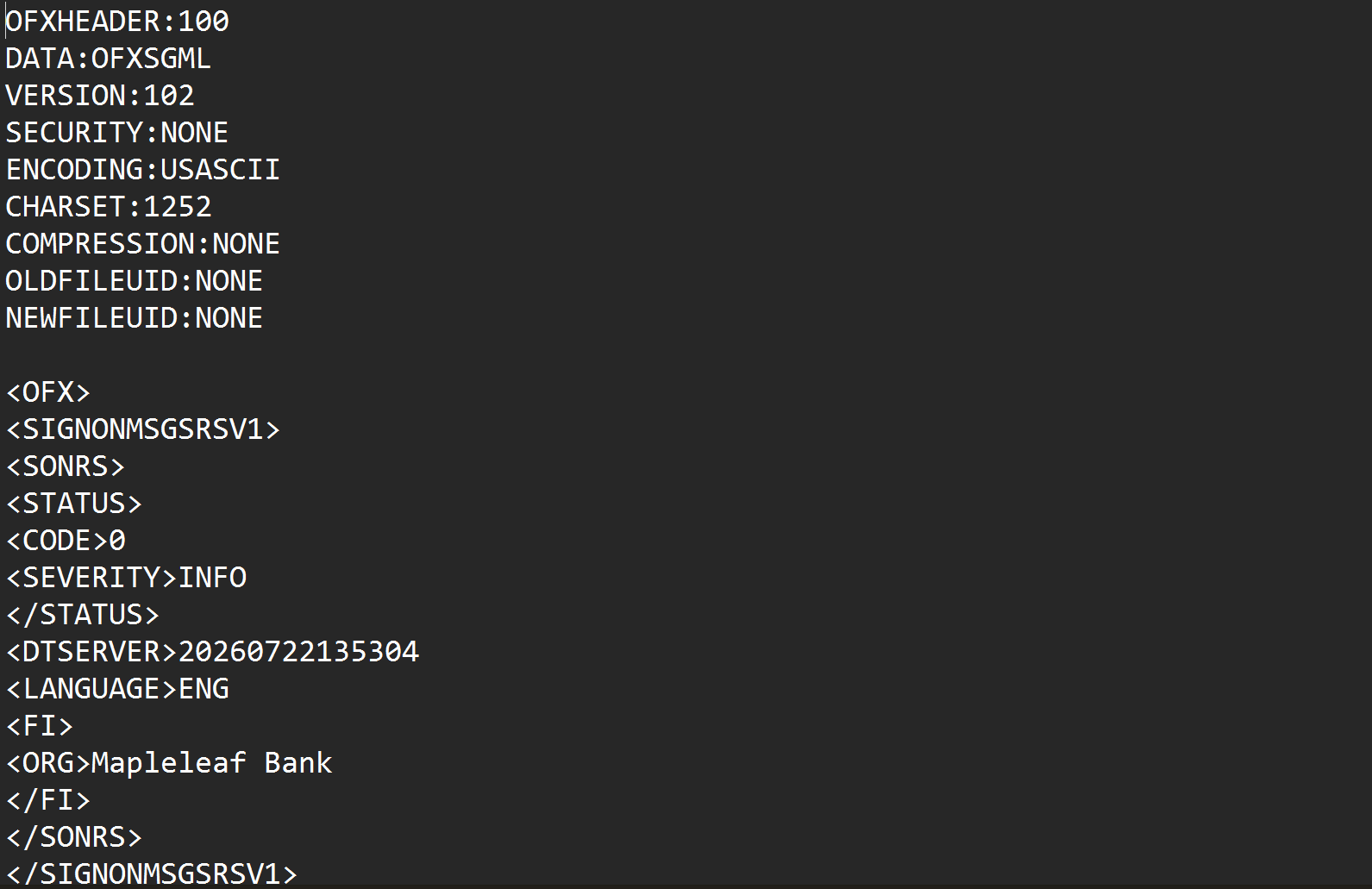
Inside, the two formats share everything that matters: the same transaction blocks, dates, amounts, and account structure. QFX adds an identification layer:
What QFX has that your OFX doesn't:
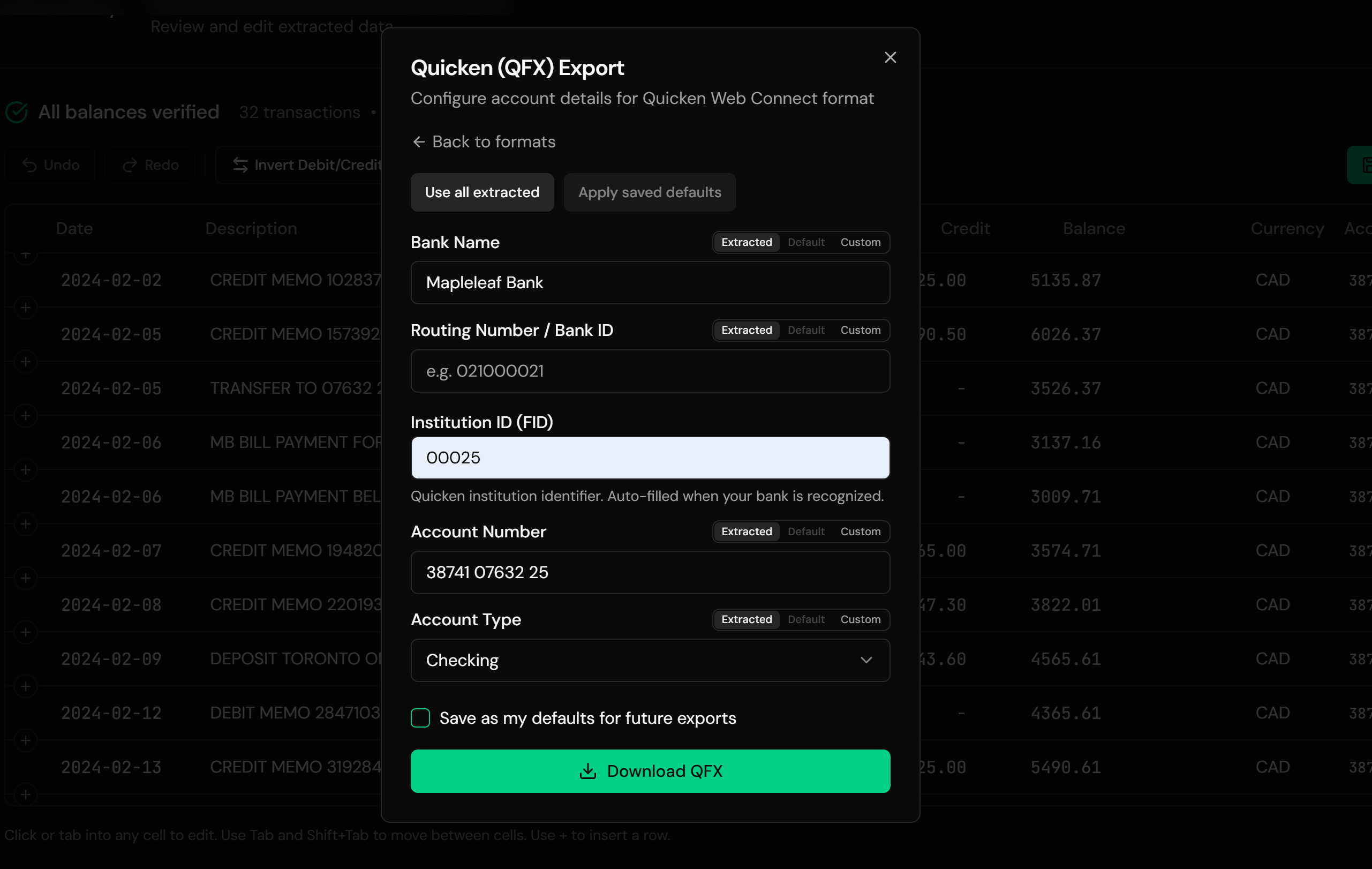
Ledger Tome resolves the identifier from your bank's name using a lookup table, and the export dialog lets you override it manually: useful for smaller institutions that aren't in the lookup. Everything else in your file carries over untouched: account details, currency, the statement's ledger balance, and every transaction.
Starting from CSV or PDF instead of OFX? See CSV to QFX and PDF to QFX . Full version-by-version guide: Import into Quicken .
Common Ways People Try to Get OFX Into Quicken
Rename .ofx to .qfx
The classic advice, and it fails: Quicken validates the tags inside the file, not the filename.
Hand-Edit the File
Add the FI block and INTU.BID in a text editor. Possible for the technical, brittle in practice, and repeated for every download.
Ask the Bank for QFX
Worth one email, but banks that dropped or never had Intuit's Web Connect program rarely add it back for one customer.
Automated OFX to QFX Conversion
Parses the OFX, carries everything over, and generates a valid QFX with resolved identifiers. Repeatable for every future download. Free to start.
OFX to QFX: Method Comparison
| Method | Time Required | Accuracy | Best For | Cost |
|---|---|---|---|---|
| Rename the file | Seconds | Fails on import | Nothing on modern Quicken | Free |
| Hand-edit tags | 15-30 minutes per file | Brittle | One-off technical rescues | Free |
| Ask the bank | Days to never | n/a | Banks still in Intuit's program | Free |
| Ledger Tome | Under a minute | Valid Web Connect output | Every OFX download, every time | Free to start |
Why automated conversion wins: the identifier problem is solved once, then every future download takes a minute.
How Ledger Tome Converts OFX to QFX
Ledger Tome parses OFX natively and re-issues it as a valid Quicken Web Connect file.
Upload
Upload your .ofx file; both OFX dialects parse natively
Carry-Over
Account details, currency, balance, and every transaction read from the file
Identify
Your bank's Intuit identifier resolved from its name, with a manual override at export
Download QFX
A valid Web Connect file, ready for File > Import
Each transaction gets a unique FITID, so re-importing the same file never duplicates your register, and credit card statements keep their correct sign convention through the conversion.
Same Data, Right Wrapper
Before: generic OFX
After: valid QFX
Use Cases
Your Bank Offers OFX Only
The standing situation this page exists for. Convert each download in a minute.
The Bank Left Intuit's Program
QFX downloads disappeared; OFX remained. Restore the old workflow.
Credit Unions & Small Institutions
Rarely in Intuit's directory; the manual FID override covers them.
Foreign Accounts in Quicken
Non-US banks ship OFX for their local software; Quicken users convert it.
Accounting Software Exports
Tools that export OFX statements, imported into a personal Quicken file.
Archived OFX Files
Old downloads converted into importable history.
Who It's For
Quicken Classic Users
Windows and Mac, wherever the bank's download stops at OFX.
Credit Union Members
The most common holders of OFX-only accounts.
Users of International Banks
OFX is the global standard; QFX is the American gate.
Ex-Web-Connect Households
Banks that dropped Intuit's program mid-relationship.
The Rename-Trick Veterans
Everyone who tried the forum advice and got rejected.
Anyone With OFX and a Quicken File
Two compatible things, one missing tag between them.
Related Converters
Ledger Tome reads and writes many financial formats. Choose the one that fits your workflow:
Starting from a CSV export instead.
Starting from a PDF statement.
The full Quicken import walkthrough.
The reverse: reading QFX files without Quicken.
Reading OFX files as spreadsheets instead.
What Ledger Tome Does Not Do
For clarity and transparency, Ledger Tome does not:
- Access bank accounts directly
- Initiate or modify transactions
- File taxes or submit reports
- Replace accounting software
- Categorize transactions automatically
It focuses solely on converting statement data into structured, accounting-ready formats.
Security & Privacy
Your Financial Data is Protected
We take statement security seriously. Here's how we protect your data:
-
Encrypted Transmission
All uploads use 256-bit SSL encryption (the same security banks use)
-
Secure Processing
Files are processed in isolated, secure environments with no human access
-
Automatic Deletion
All uploaded files are permanently deleted after 7 days (or immediately upon request)
-
No Training Data
Your statements are never used to train AI models or shared with third parties
-
No Account Access
We never access your bank account directly or store your banking credentials
-
GDPR Compliant
Full compliance with data protection regulations
-
No Permanent Storage
We don't maintain a database of your financial information
Privacy First: We process your data solely for conversion purposes. No marketing, no data selling, no third-party sharing.
Frequently Asked Questions
Why won't Quicken import my OFX file?
Can I just rename .ofx to .qfx?
What does the conversion actually change?
What if my bank isn't in the identifier lookup?
Does this work with OFX 2.x XML files?
Will importing create duplicates in Quicken?
Does this work for credit card OFX files?
Will my account details carry over?
Can I review the data before downloading?
How much does it cost?
Troubleshooting Common Issues
Quicken still rejects the converted file
The resolved identifier may not match your institution. Look up your bank's FID and enter it manually in the export dialog; if the problem persists, contact support.
File isn't recognized on upload
Confirm it's actually OFX: it should contain OFXHEADER or an <OFX> tag near the top. Some banks label CSV exports as "OFX" loosely.
Transactions went to the wrong account
Quicken links each file to an account on first import. Delete the imported transactions and re-import against the correct account.
Amounts look reversed
Bank and credit card files use opposite sign conventions, decoded from the file type. Check the preview against a known transaction before export.
Some transactions were skipped
Entries without a posted date are skipped with a warning stating how many. Check the source file if the count surprises you.
Summary
QFX is OFX with Intuit's identification tags, and Quicken enforces the difference: no INTU.BID, no import, no matter what the file is named. Hand-editing is brittle and banks rarely add QFX support on request. Automated conversion re-issues your OFX as a valid Web Connect file with the identifiers resolved, and turns a recurring annoyance into a one-minute step.
If Quicken keeps rejecting your bank's OFX downloads, Ledger Tome converts them properly.
Ready to Make Quicken Accept Your Bank's Files?
Stop fighting the rename trick. Convert your first OFX to a valid QFX in minutes.
Used by Quicken users, credit union members, and international account holders