Convert PDF bank statements to QBO
Your bank feed will not reach back far enough, and QuickBooks Desktop only reads one kind of file. Ledger Tome makes that file from the PDF statement you already have.
- Goes straight into Bank Feeds, no column mapping
- Bank and credit-card accounts both
- Institution and account details read off the statement
Using QuickBooks Online rather than Desktop?
The file works there too, but you may not need it: QuickBooks Online documents uploading account statements as PDF or image files directly, as well as accepting QBO in its transaction-list upload. This page is written for Desktop, where a Web Connect file is the only way in.
The file QuickBooks Desktop is asking for
A .qbo file is a QuickBooks Web Connect transaction file. Intuit's documentation is explicit that .qbo is the only file type QuickBooks Desktop Web Connect reads, and that it is imported through Banking, then Bank Feeds, then Import Web Connect Files. The same guidance says QFX and QIF files will not work there.
Sources: Intuit: Set up bank accounts for Bank Feeds in QuickBooks Desktop · Intuit: Fix Web Connect import errors · Intuit: Download bank feed transactions in QuickBooks Desktop
Underneath, it is an OFX document. The header says OFXHEADER:100 and VERSION:102, and the body is the same tagged SGML that a plain OFX file uses. What makes it a Web Connect file rather than plain OFX is a small set of Intuit-specific tags in the signon block, which is the whole of the difference between the two exports.
The three letters are unhelpfully close to QuickBooks Online, which is a different product entirely. If you landed here from that direction, see the note above.
Inside the file you download
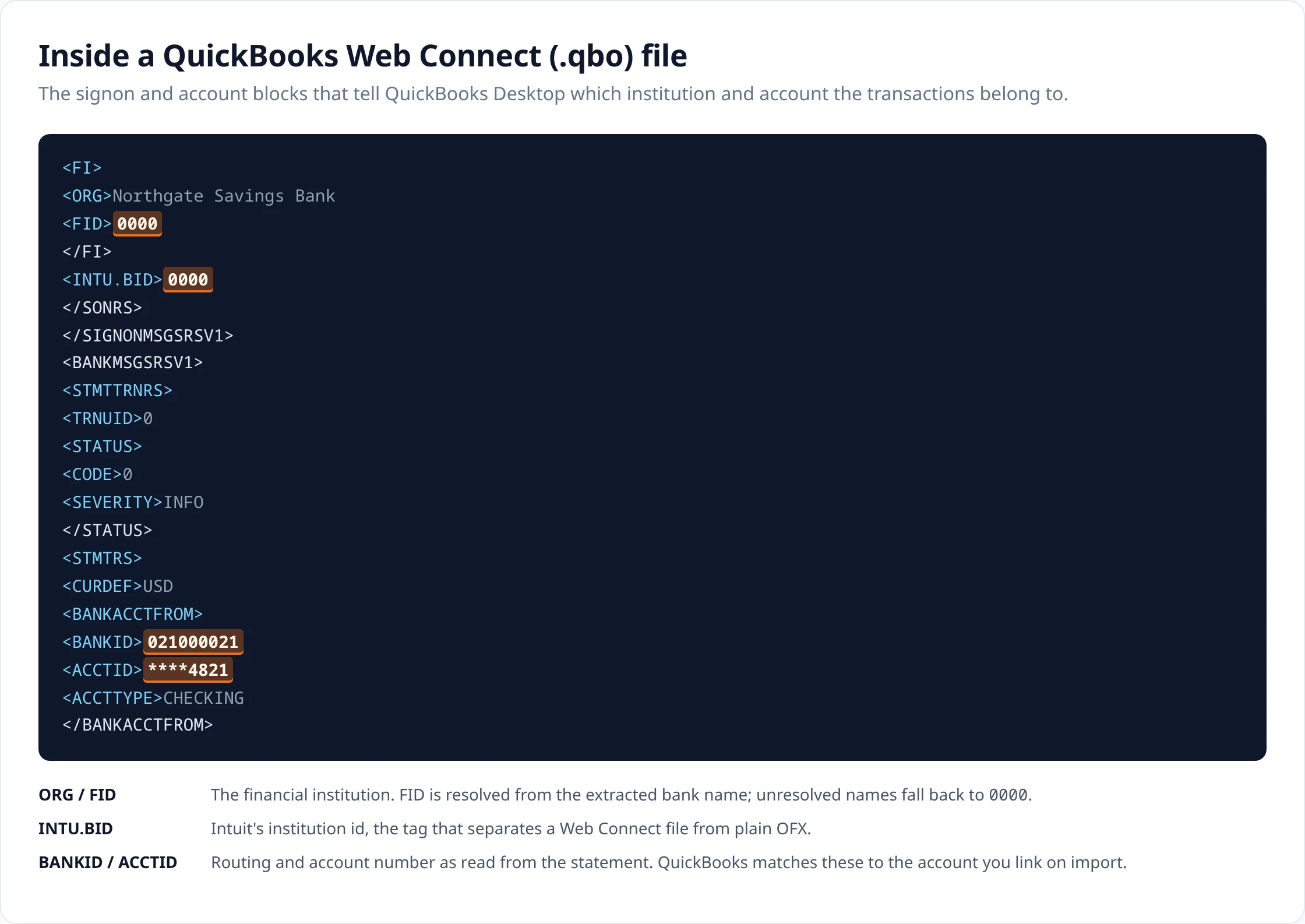
You will probably never open one, but it is worth seeing once, because most import problems come down to one of these fields. This is from a file generated for a sample checking-account statement, unedited.
<FI>
<ORG>Northgate Savings Bank
<FID>0000
</FI>
<INTU.BID>0000
</SONRS>
</SIGNONMSGSRSV1>
<BANKMSGSRSV1>
<STMTTRNRS>
<TRNUID>0
<STATUS>
<CODE>0
<SEVERITY>INFO
</STATUS>
<STMTRS>
<CURDEF>USD
<BANKACCTFROM>
<BANKID>021000021
<ACCTID>****4821
<ACCTTYPE>CHECKING
</BANKACCTFROM>
-
ORG and FID are the bank. We take the name off your statement and look it up against Intuit's list of institution IDs. If the name is abbreviated or unusual and we cannot place it, the file is still written and
FIDcomes out as0000, which you can correct at export rather than having us guess at an institution on your behalf. The list is Intuit's own published institution directory. - INTU.BID carries the same identifier. This tag is what separates a Web Connect file from plain OFX.
- BANKID and ACCTID are the routing number and account number as read from the statement, and ACCTTYPE is CHECKING or SAVINGS. If the statement did not print a routing number you can supply one before export.
-
CURDEF is the statement currency. Further down the file, after the transactions,
LEDGERBALcarries the closing balance and the date it applied.
Each transaction is a STMTTRN block:
<STMTTRN>
<TRNTYPE>DEBIT
<DTPOSTED>20260303
<TRNAMT>-86.40
<FITID>20260303000001
<NAME>CARD PURCHASE - HARBOURSIDE GROC
<MEMO>CARD PURCHASE - HARBOURSIDE GROCERY MARKET
</STMTTRN>
TRNAMT is signed, negative for money out. NAME is capped at 32 characters and a longer description is carried in full in MEMO, which is why the row above has both.
Why importing the same file twice does nothing
Intuit documents that Web Connect transactions carry unique identifiers, that QuickBooks stores them, and that it ignores a transaction whose identifier it has already recorded. That is the mechanism behind both the good outcome, re-importing a file does not double your ledger, and the confusing one, an import that reports nothing imported.
Source: Intuit: Nothing imported after importing a Web Connect (.qbo) file
Ledger Tome builds each identifier from the transaction's posting date followed by its position in the exported file, so the first row of the sample above is 20260301000000. Two consequences follow, and both are worth knowing before you import:
- Import the same file twice by accident and the second one is ignored. Nothing doubles, and the alarming blank screen you get is QuickBooks working correctly.
- Editing a description or an amount leaves identifiers untouched, but deleting or inserting a row shifts the identifier of every row after it. Re-importing after such an edit can therefore re-add rows QuickBooks already holds.
So the order matters: finish reviewing, then export, then import. If the row set has to change after an import, reconcile the register against the statement rather than importing again and trusting the identifiers to sort it out.
Bank QBO and credit-card QBO are different files
The account type read from the statement changes the structure of the file, not just a label inside it.
-
Message set. A bank account is written as
BANKMSGSRSV1containingSTMTRS; a credit card asCREDITCARDMSGSRSV1containingCCSTMTRS. -
Account block. A bank account carries
BANKACCTFROMwith a routing number, an account number and an account type. A card carriesCCACCTFROMwith the card number alone, because there is no routing number and no account type to state. -
Sign. Card statements are extracted with the liability convention, where a charge increases what you owe. On export the sign is flipped so the file reads the way an issuer's own download does: charges negative, payments positive, with
TRNTYPEfollowing the sign that is actually written.
Getting it into QuickBooks
- In QuickBooks Desktop, go to Banking, then Bank Feeds, then Import Web Connect Files.
- Select the .qbo file you exported.
- Link it to the existing QuickBooks account for that bank account, or create a new account if this is the first import.
- Review the transactions in the Bank Feeds Center and accept them into the register.
Import against the account the statement belongs to. A file imported into the wrong account is not rejected, it is accepted into the wrong register, and unwinding that is more work than the import saved.
When the import does nothing, or the wrong thing
Worth separating what a converted file can cause from what it cannot.
- Nothing was imported. Usually the identifiers were already recorded from a previous import of the same rows. Check the register for the date range before importing again.
- QuickBooks asks you to sign in or reports an expired service. This is a QuickBooks or account-configuration matter, not a property of the file. Web Connect availability depends on your QuickBooks version and its service status.
- The institution does not look right. The FID comes from matching the bank name printed on the statement. An unusual or abbreviated name may not match, in which case the file exports with the fallback identifier. You can set the bank name and routing number yourself before exporting.
-
The file will not open at all. Confirm the extension really is
.qbo; Web Connect reads no other file type, and renaming a CSV or an OFX file does not make one.
Upload
Add the statement PDF, or several at once.
Review
Check the extracted rows against the statement and fix anything that looks wrong.
Export
Download in the format you need.
How it works covers extraction, validation and combining statements in detail.
Questions about this format
- Is a .qbo file the same thing as QuickBooks Online?
-
No, and the name is the main source of confusion here. A .qbo file is a QuickBooks Web Connect transaction file, the format QuickBooks Desktop reads in Bank Feeds. QuickBooks Online is a separate product that happens to share three letters with the extension.
- Does QuickBooks Desktop import QBO files?
-
Yes. Intuit documents .qbo as the file type QuickBooks Desktop Web Connect reads, imported through Banking, then Bank Feeds, then Import Web Connect Files.
- Can QuickBooks Online upload a QBO file?
-
QuickBooks Online documents QBO among the file types accepted in its transaction-list upload flow, alongside CSV, TXT and OFX. It also documents uploading account statements as PDF or image files in its own statement workflow, so a conversion is not always a prerequisite there.
- Why did QuickBooks say nothing was imported?
-
The most common cause is that every transaction in the file has an identifier QuickBooks has already seen, because Intuit documents that QuickBooks stores transaction IDs and ignores repeated ones. A different cause is that the file was imported against the wrong account. Neither shows an error; both look like nothing happened.
- How are FITIDs generated?
-
Each transaction gets its posting date followed by its position in the file, so the first row of a March statement becomes 20260301000000. Exporting the same reviewed statement again produces the same identifiers. Deleting or inserting a row shifts the identifiers of every row after it.
- Can a QBO file hold a credit-card statement?
-
Yes. When the extracted account type is a credit card the file uses the credit-card message set rather than the bank one: CREDITCARDMSGSRSV1 instead of BANKMSGSRSV1, an account block carrying only the card number, and amounts signed so that charges are negative and payments positive.
- QBO or CSV?
-
QBO if the destination is QuickBooks Desktop Bank Feeds, because it carries the account and institution context and needs no column mapping. CSV if you are going anywhere else, or if you want to inspect and transform the rows first.
General questions about scans, languages, page counts, editing and pricing are answered on the FAQ .
Uploads and generated files are encrypted at rest, deleted automatically after seven days, and can be deleted from your history whenever you want. Documents sent to AI providers are not used to train their or our models.
Security sets out storage, retention and provider handling; Privacy is the full policy.
Related converters
- PDF to QFX — the Quicken Web Connect equivalent.
- PDF to OFX — the same statement without Intuit institution tags.
- Bank statement to CSV — when you need the rows rather than a bank feed.
- Bank statement to Excel — for review before or after the import.
Convert a statement, check the rows, then export a Web Connect file.
The free plan includes 10 tokens on signup plus 3 a week. Pricing