Convert credit-card statements to CSV
Card statements are where converters quietly get things wrong: a payment on the wrong side, a purchase on the day it cleared rather than the day you spent. Ledger Tome keeps both straight.
- The right one of the two printed dates
- Charges and payments never confused
- Four statement sections, one table
A card statement runs backwards from a bank statement
A card statement is a liability statement. The balance is what you owe, so it moves the opposite way from a bank balance: a purchase increases it and a payment reduces it. That single inversion is behind most of what makes card extraction different.
The rows are recorded the way the statement presents them:
- Purchases, cash advances, fees and interest increase what you owe and are written to the Credit column.
- Payments and refunds reduce it and are written to the Debit column.
Both columns hold unsigned numbers, so which column a figure is in carries the direction and no minus sign has to survive the round trip. Where a statement prints an amount with a minus sign, the sign decides the column and is then dropped, which is why a negative amount printed in a purchases section still lands on the payments side: money coming back to you is money coming back to you, whatever heading it is printed under.
Which of the two dates ends up in your file
Most card rows print two dates. A purchase made on the 6th might post on the 9th, and both dates appear on the line. Only one of them can go in the exported Date column, and which one is right depends on what the row is.
| Row is a | Exported date | Why |
|---|---|---|
| Purchase | Transaction date | The day the money was spent, which is what a receipt shows. |
| Cash advance | Transaction date | Same reasoning: the withdrawal happened on that day. |
| Refund or merchant credit | Transaction date | It traces back to a purchase, so it belongs beside one. |
| Payment | Posting date | The balance changed when the payment cleared, not before. |
| Fee, interest, adjustment | Posting date | The issuer charged it on that date; there is no earlier event. |
| Row printing only one date | That date | Nothing is inferred, and never copied from a neighbouring row. |
The reason to care: a payment landing on the wrong date is the error most likely to get past you. It is one row among two hundred, it looks perfectly ordinary, and you only find it at the period cut-off. So the choice between the two dates is not left to judgement, it follows the table above on every row, every time.
One exception, for a statement style you may run into. A few accounts print both dates but run the balance column in posting order, so the table above would put the rows slightly out of step with the balances beside them. When the printed balances only add up if every row takes its posting date, the whole account switches to posting dates. Your statement's own arithmetic outranks the rule.
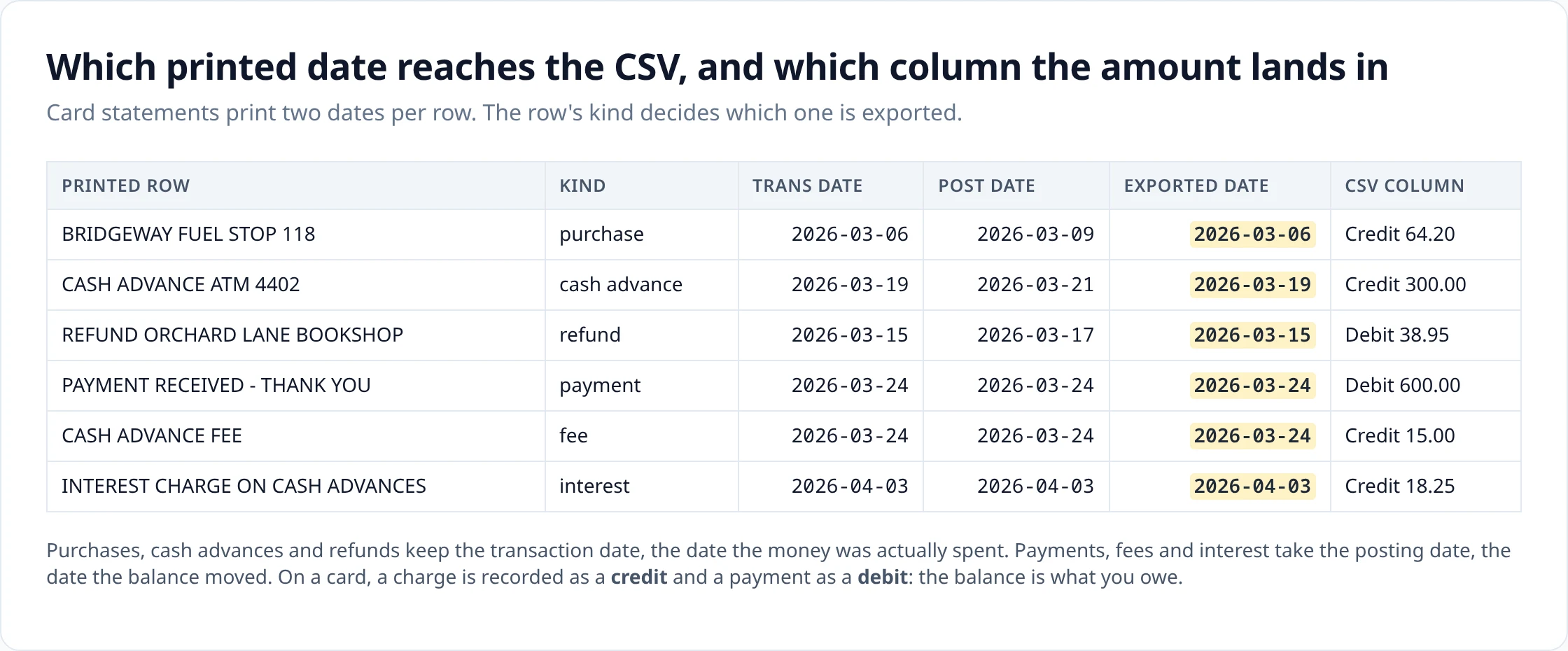
The rows, read back
The same seven columns as any statement export, filled the card way. These are the rows generated from the sample statement above, unedited.
Date,Description,Debit,Credit,Balance,Currency,Account_ID
2026-03-06,BRIDGEWAY FUEL STOP 118,,64.20,1269.08,USD,****3067
2026-03-11,ORCHARD LANE BOOKSHOP,,38.95,1308.03,USD,****3067
2026-03-17,REFUND ORCHARD LANE BOOKSHOP,38.95,,1269.08,USD,****3067
2026-03-19,CASH ADVANCE ATM 4402,,300.00,1569.08,USD,****3067
2026-03-24,PAYMENT RECEIVED - THANK YOU,600.00,,969.08,USD,****3067
2026-03-24,CASH ADVANCE FEE,,15.00,984.08,USD,****3067
2026-04-03,INTEREST CHARGE ON CASH ADVANCES,,18.25,1002.33,USD,****3067
Reading it back: the fuel purchase and the bookshop purchase sit in Credit on their transaction dates. The bookshop refund sits in Debit, also on its transaction date. The payment sits in Debit on its posting date. The cash advance fee and the interest charge sit in Credit on the dates they were charged, which is why the interest line carries an April date on a statement that runs from March. Balance is filled in on every row even though the issuer printed no running total per line: it is worked out from the opening and closing figures the statement does print and the amounts between them, so it rises with each charge and falls on the refund and the payment.
If your pipeline wants one signed column instead of two, add the derived Amount column in an export layout before downloading. It writes a negative number for a debit and a positive one for a credit, which on a card statement means payments negative and charges positive.
Four sections, one table
Card statements are laid out by category, not chronology. A typical one opens with a summary of the previous balance, payments, purchases and the new balance, then lists purchases under one heading, payments and credits under another, and fees and interest under a third, often across several pages and sometimes split by cardholder.
What comes back is one table in date order. Every amount-bearing line becomes exactly one row, so the count of rows matches the count of printed lines, and the section a line sat under is used to decide its direction rather than to split the output. A statement with several cards rolling up to one balance stays one account, keyed to the statement account number, rather than being split by card.
Summary figures are not transactions and do not become rows. If they did, every payment would appear twice: once in the summary and once in the payments section.
What people do with these rows
Card rows tend to be an input to something else rather than the destination. CSV is what those systems take.
- Expense workflows. Filter to the Credit column and you have exactly the spending lines, ready to match against receipts or push into an expense tool.
- Vendor and category analysis. A year of statements as one CSV joins to a merchant lookup in a few lines of script; the same year as twelve PDFs does not.
-
Import preparation. Most accounting imports start from a CSV and a column mapping, and a card export usually needs its own mapping because of the direction convention. QuickBooks Online documents a fixed three- or four-column shape for the upload; Xero maps your columns in a wizard and remembers the mapping. Match whichever one you use in an export layout and the mapping stops being a monthly job.
Sources: Intuit: Format CSV files to get bank transactions into QuickBooks · Xero: Import a bank statement in CSV format
When a person is going to read the file rather than a program, the Excel export is the better shape.
What to check before you export
Card-specific things worth a look in the review step.
- The payment row. Confirm it is on the Debit side. It is the single largest row on most statements, and a payment on the wrong side is a two-payment-sized error.
- Refunds and statement credits. Same check: money coming back belongs in Debit, whatever section it was printed under.
- Foreign-currency purchases. These print an original amount and an exchange rate inside the description. Only the figure in the amount column is the transaction; check that the row's amount is the charged one.
- Fees and interest. Confirm they are present at all. They are often on the last page, after the transactions.
- The totals. Credits minus debits should equal the movement between the opening and closing balance printed on the statement.
- Pending transactions. Rows the issuer has not booked yet are marked separately and excluded from the export by default; they have not moved the balance and will come back with a different date once they settle.
Upload
Add the statement PDF, or several at once.
Review
Check the extracted rows against the statement and fix anything that looks wrong.
Export
Download in the format you need.
How it works covers extraction, validation and combining statements in detail.
Questions about this format
- Why can a payment carry a different date from the one printed first on the row?
-
Because a card row often prints two dates and they mean different things. A payment, a fee or an interest charge is exported on its posting date, the day the balance actually moved. A purchase is exported on its transaction date, the day you spent the money, which is usually a day or two earlier than the posting date.
- What date is used for purchases?
-
The transaction date. Purchases, cash advances and refunds all keep the date the transaction happened rather than the date it cleared, because that is the date that matches a receipt and the date an expense belongs to.
- How are refunds shown?
-
A refund reduces what you owe, so it is written to the Debit column, the same side as a payment. It keeps its transaction date, unlike a payment, because a refund traces back to a purchase.
- How are fees and interest shown?
-
Both increase what you owe, so they go in the Credit column alongside purchases, and both are exported on their posting date. A cash advance fee and the interest charged on the advance therefore sit on the dates the statement charged them, not on the date of the advance.
- What if purchases and payments are printed on different pages?
-
They are read from wherever they appear and come back as one table ordered by date. Card statements routinely separate a summary, a purchases section, a payments-and-credits section and a fees-and-interest section across several pages; that layout does not survive into the export, and it does not need to.
- Does the CSV include a balance?
-
Yes. Most issuers print only an opening and a closing figure with no running balance per line, so the column is worked out from those two anchors and the amounts between them. The result reconciles: start at the opening balance, apply each charge and payment in order, and you land on the closing balance the issuer printed.
- Card CSV or card Excel?
-
CSV when the rows are going into something else: an expense system, a script, a database, a spreadsheet you already have a template for. Excel when you are going to sit and look at them.
General questions about scans, languages, page counts, editing and pricing are answered on the FAQ .
Uploads and generated files are encrypted at rest, deleted automatically after seven days, and can be deleted from your history whenever you want. Documents sent to AI providers are not used to train their or our models.
Security sets out storage, retention and provider handling; Privacy is the full policy.
Related converters
- Credit card statement to Excel — the same rows as a workbook for reconciliation.
- Bank statement to CSV — the bank-account version, where the statement prints the balance itself.
- PDF to OFX — a structured card file for software that imports OFX.
- PDF to QFX — the Quicken Web Connect route for card accounts.
Convert a card statement and check the payment row before you export.
The free plan includes 10 tokens on signup plus 3 a week. Pricing