Convert credit-card statements to Excel
Somebody has to go through the charges and decide what each one was. Ledger Tome gives you a sheet built for exactly that, with spending and settlement already in separate columns.
- Spending and payments in separate columns
- Amounts you can sum on opening
- Several months in one sheet
The slow part is not the numbers
Getting the transactions out of the PDF is the quick half. The half that takes the evening is going down forty lines deciding what each one was: most are obvious, six need a receipt chasing, two nobody recognises, and one turns out to be a subscription that was supposed to be cancelled in March.
So the sheet is built for the deciding. Charges are already in their own column, apart from payments and refunds, so you can filter to the spending and work down it without first untangling which rows were money going out. Sort that column high to low and the charges most worth querying are at the top.
And because a card statement prints by section rather than by date, with purchases on one page and fees three pages later, what you get back is a single list in date order. Nothing is hiding on page four.
Charges one side, payments the other
A card balance is what you owe, so the two amount columns mean the opposite of what they mean on a bank statement. Worth fixing in your head before you start filtering, because everything else follows from it.
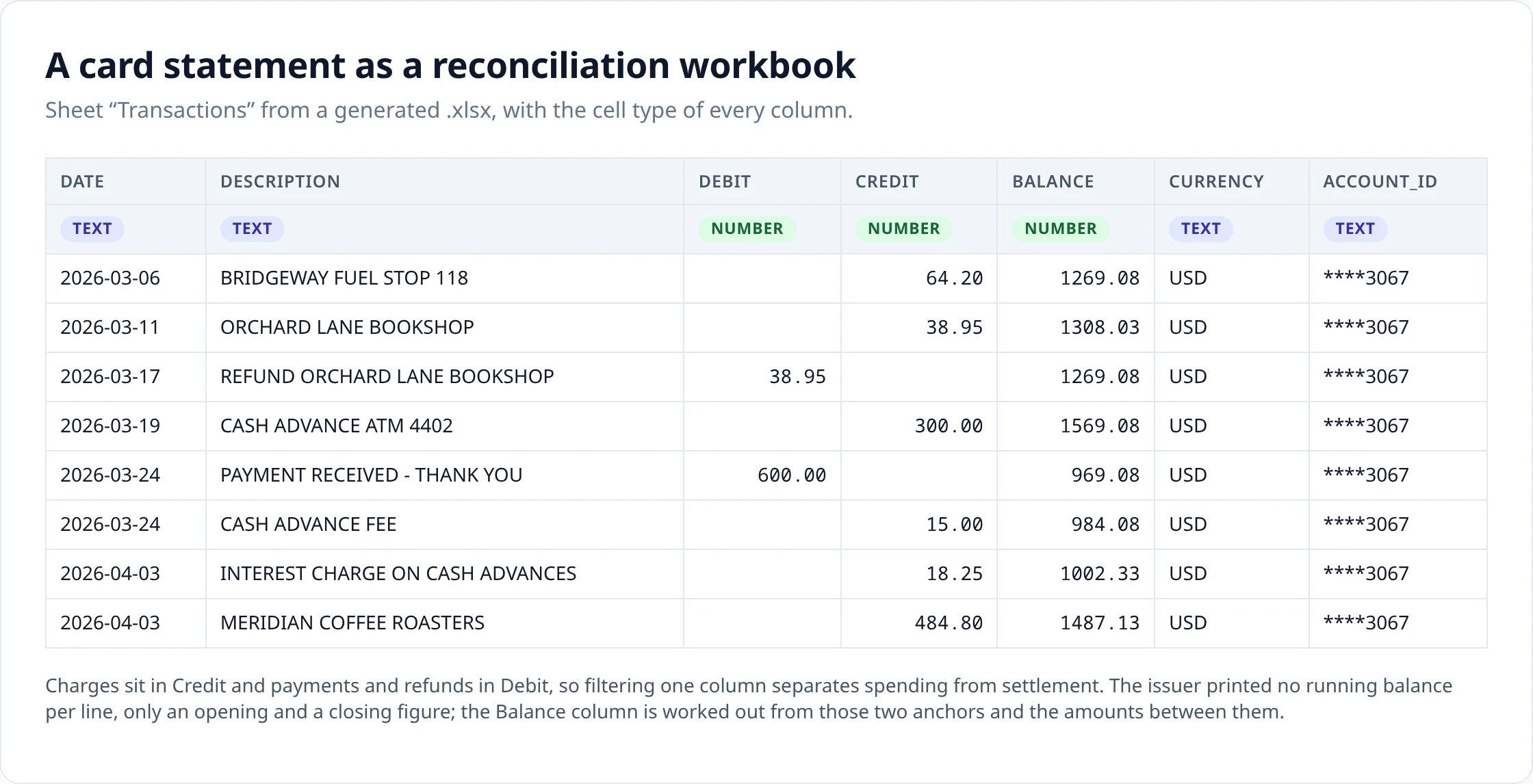
- Credit is money you owe more of: purchases, cash advances, fees, interest.
- Debit is money you owe less of: payments, refunds, statement credits.
- Neither column carries a sign. Direction lives in which column the figure sits in, so a stray minus cannot quietly flip a row.
The practical payoff is one formula. SUM(Credit) - SUM(Debit) is what the balance moved by over the period, and it should equal the closing balance minus the opening balance printed on the statement. If those two agree, no row went missing between the PDF and the sheet, and you can spend your attention on the charges instead of on the arithmetic.
The Balance column is filled in even though your issuer almost certainly did not print one. Cards show an opening figure, a closing figure and the transactions between, so the running balance is worked out from those two anchors and the amounts in between. It reconciles by construction: the last row lands on the closing balance the issuer printed, which is also the quickest way to see that no row went missing between the PDF and the sheet.
Two dates, and the one that reaches the sheet
Card rows usually print a transaction date and a posting date, a day or three apart. Which one lands in the Date column is not cosmetic: it decides which month a charge falls in, and therefore which period it hits.
Purchases, cash advances and refunds keep the transaction date, because that is the day the money was spent and the day the receipt is dated. Payments, fees and interest take the posting date, because that is when the balance moved. A statement running to the 3rd of the month can therefore carry an interest charge dated April on an otherwise-March sheet, which is correct and worth expecting.
This is decided per row from what the statement printed, not left to whoever is reading. The card CSV page sets out the full rule and the one case where a statement's own balances override it.
Handing it to somebody else
Card review is rarely finished by the person who runs the conversion. The queries go back to the cardholder, the receipts come from somebody else, and the file has to survive that round trip.
A workbook survives that round trip in a way an import file does not. Add a column for who spent it and one for whether a receipt exists, send the sheet out, get it back with the answers typed in, and every original figure is still sitting beside them. A CSV is usually swallowed by an import and gone.
What makes that survive the round trip is that the amounts are real numbers rather than text that looks like numbers, so the totals still add up after the file has been through a couple of inboxes and somebody has sorted it. This is the structure read back out of a workbook generated from a sample card statement:
Date          text
Description   text
Debit         number
Credit        number
Balance       number
Currency      text
Account_ID    text
Nothing is pre-filled: no category column, no formulas, no reviewer field. Those are guesses about how your firm works, and a guessed category is one somebody has to check anyway.
A quarter of statements, one list
Statements arrive monthly, but nobody reviews them monthly. It is a quarter's worth in front of you, or a year's at the end of it. Convert each statement, then combine them before exporting, and the whole period lands as one list in date order rather than three files you paste under each other.
Statements that share a day are the interesting case. A charge appearing on the end of one statement and the start of the next is recognised as the single charge it is. But four coffees at the same price on the same Tuesday are four coffees, and no amount of matching can prove otherwise, so that run is put in front of you to decide instead of having one of them quietly dropped. Charges the issuer had not booked yet stay behind on their own conversion; they will be back, with a different date, once they settle.
When the sheet is not the destination
- Feeding an expense tool or a script: card CSV .
-
QuickBooks Desktop Bank Feeds: QBO
, which writes cards with their own message set.
Source: Intuit: Set up bank accounts for Bank Feeds in QuickBooks Desktop
- Quicken: QFX , the Web Connect format Quicken documents for credit-card downloads.
-
Anything documenting OFX import: OFX
.
Sources: Xero: Import an OFX bank statement · GnuCash manual: Importing transactions from files
Upload
Add the statement PDF, or several at once.
Review
Check the extracted rows against the statement and fix anything that looks wrong.
Export
Download in the format you need.
How it works covers extraction, validation and combining statements in detail.
Questions about this format
- Are the amounts numeric cells?
-
Yes. Debit and Credit are written as numbers, so you can sum the Credit column to get the period's spending and the Debit column to get payments and refunds, with no cleanup pass first.
- A charge is dated the month after the statement. Is that wrong?
-
Probably not. Fees and interest take their posting date, and a statement closing on the 3rd will have charged them on the 3rd, so they legitimately carry the later month. Purchases keep the date you spent the money, so those stay where you expect them.
- Are dates real Excel date cells?
-
They can be. Choose the Excel date option before you export and the column comes through as real dates, so filtering to a month or pivoting by quarter works immediately. The default is ISO text, which is the safer starting point on a card statement: rows carry two candidate dates a few days apart, and a locale reading 03/04 as the wrong month would move a charge into the wrong period without saying so.
- Can I filter purchases and payments apart?
-
Yes, and no extra column is needed for it. Charges are in Credit and payments and refunds in Debit, so filtering for non-empty cells in one column isolates one side of the account. Add an autofilter with Ctrl+Shift+L after opening the file.
- How do refunds, fees and interest appear?
-
A refund sits in Debit alongside payments, because it reduces what you owe. Fees and interest sit in Credit alongside purchases, because they increase it. Fees and interest also take their posting date, while refunds keep their transaction date.
- Can several monthly card statements be combined?
-
Yes. Convert each month, then combine before exporting. The rows are ordered by date across the whole set and overlapping rows between consecutive statements are detected so one copy is kept. Where a run of identical rows cannot be resolved automatically, it is shown to you rather than deduplicated silently.
- Where does the Balance column come from?
-
It is not, and that surprises people, because most issuers print no running total per line. The column is worked out from the opening and closing figures your statement does print, plus the amounts between them, so the last row lands exactly on the printed closing balance. If it did not, a row would be missing.
- Excel or CSV for card statements?
-
Excel when the file is the workpaper: you are reviewing, annotating and handing it to somebody. CSV when the rows are feeding an expense tool, a script or an import wizard.
General questions about scans, languages, page counts, editing and pricing are answered on the FAQ .
Uploads and generated files are encrypted at rest, deleted automatically after seven days, and can be deleted from your history whenever you want. Documents sent to AI providers are not used to train their or our models.
Security sets out storage, retention and provider handling; Privacy is the full policy.
Related converters
- Credit card statement to CSV — the same rows as text, and how the two printed dates resolve.
- Bank statement to Excel — the bank-account workbook, where the statement prints the balance itself.
- PDF to OFX — a structured card file for software that imports OFX.
- Bank statement to QBO — Web Connect files, including the credit-card message set.
Convert a card statement and open the workbook before posting anything.
The free plan includes 10 tokens on signup plus 3 a week. Pricing