Convert PDF bank statements to CSV
Something downstream needs your statement as rows: a script, a spreadsheet, an import wizard. Ledger Tome gets you those rows, formatted to your need.
- Every row shown before you export
- Multi-page statements come back as one file
- Pick your own columns, date format and delimiter
Seven columns out of the box, or the ones you actually want
The default export is the seven columns below. If the system at the other end wants something else, you change it here rather than reshaping the file afterwards: pick the columns, drag them into the order it expects, rename the headers to match its wording, and save that as a layout you can reuse next month.
These are the first rows of a default file, generated from a sample checking-account statement and unedited.
Date,Description,Debit,Credit,Balance,Currency,Account_ID
2026-03-01,Opening Balance,,,4820.15,USD,****4821
2026-03-03,CARD PURCHASE - HARBOURSIDE GROCERY MARKET,86.40,,4733.75,USD,****4821
2026-03-05,DIRECT DEPOSIT PAYROLL,,2480.00,7213.75,USD,****4821
2026-03-09,ACH DEBIT MERIDIAN PROPERTY MGMT RENT,1650.00,,5563.75,USD,****4821
-
Header row. By default
Date,Description,Debit,Credit,Balance,Currency,Account_ID, and every one of those labels is editable, so a destination expectingTransaction DateorWithdrawalgets it spelled its way. -
Dates are ISO
YYYY-MM-DDunless you pickDD/MM/YYYYorMM/DD/YYYYfor an importer that insists on one. - Amounts are plain unsigned decimals with a dot separator and no thousands grouping, no currency symbol and no padding. A row fills either Debit or Credit, never both. If your destination wants one signed column instead, add the derived Amount column and drop the other two.
- Descriptions are written as printed. A field is wrapped in double quotes only when it contains a comma or a quote, and an embedded quote is doubled.
- Balance is filled on every row. Where the statement prints a running balance per line that figure is used; where it prints only an opening and a closing balance, the column is worked out from those anchors and the amounts between them.
- Currency and Account_ID repeat on every row, so a file holding two accounts stays separable after it is sorted or merged.
- Encoding and delimiter. UTF-8 with a byte-order mark, so Excel opens it without mangling accented merchant names. Comma-separated by default, with semicolon and tab available for systems that expect them, and a comma decimal mark for European formats.
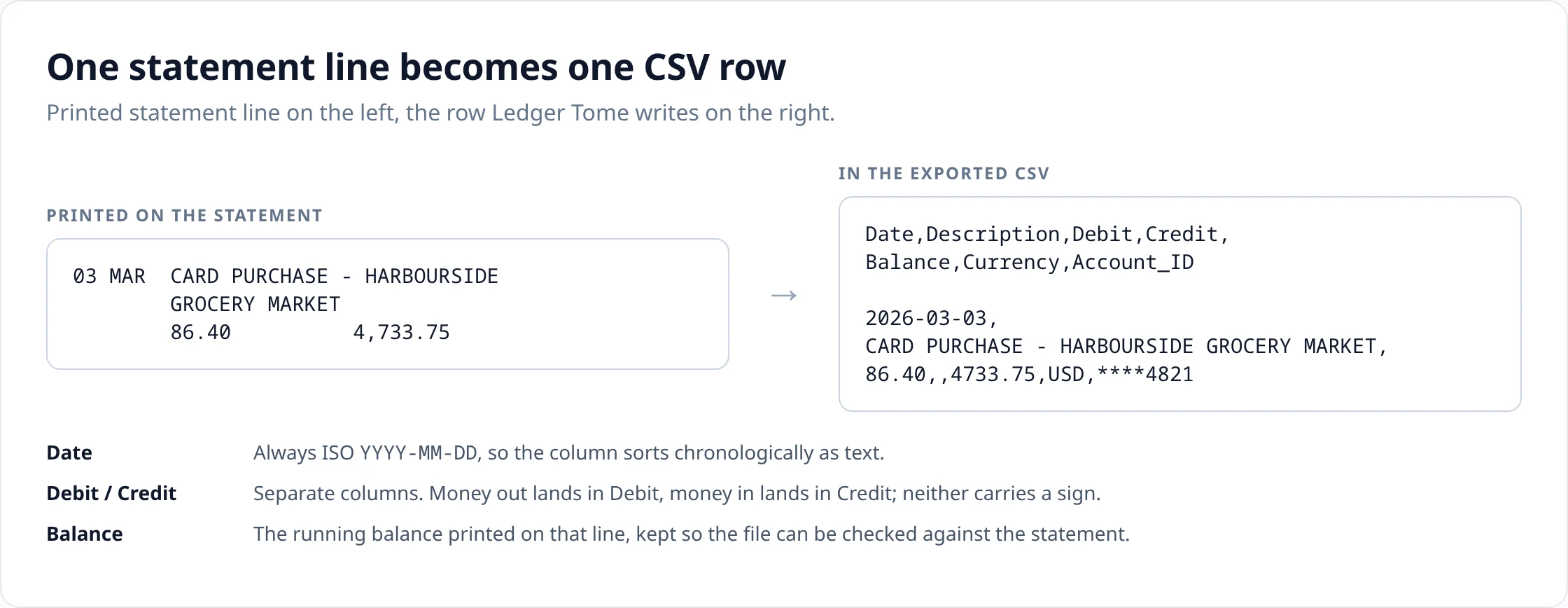
How a printed line becomes a row
A statement line is arranged for someone reading a page: a short date, a description that wraps over two lines, an amount in one of two columns, a running balance on the right. The row is that same line with the page taken away.
Where a CSV will import, and where it needs mapping first
A CSV file says nothing about what its columns mean. That is its strength when you are moving data into a script, a database or a spreadsheet, and its limitation when the destination is an accounting product, because each one defines its own expected layout.
QuickBooks Online documents specific three- and four-column structures for transaction uploads, along with rules about date and amount formatting. Xero imports bank statement CSVs through a wizard that asks you to map each column and then remembers the mapping, and its own guidance recommends OFX where the bank offers it. Neither one accepts an arbitrary seven-column file as-is.
Sources: Intuit: Format CSV files to get bank transactions into QuickBooks · Xero: Import a bank statement in CSV format · Xero: About manually importing bank transactions
Which is the argument for doing the shaping here rather than there. Build a layout whose columns, order, headers and date format already match what the destination documents, save it, and the mapping step becomes a one-time job instead of a monthly one. Where a destination has its own structured file format such as OFX, though, that format is still the shorter path.
CSV or Excel
CSV wins where the file does not need to be edited. It is plain text, so a script can read it without a library; it diffs cleanly in version control; it loads into a database or a data warehouse in one statement; and it is the format almost every import wizard offers first. It also stays small: the same rows as a workbook take a fraction of the bytes.
What it gives up is everything a workbook holds beyond the values themselves. There are no cell types, so nothing in the file records that Debit is a number and Description is not. There is no second sheet, no column widths, no formatting. If a person is going to open the file and work in it then an Excel export is the better choice.
Checked automatically
A CSV row cannot vouch for itself. Once the file is written, nothing in it tells you whether 86.40 is what the statement said or what a smudged scan looked like. And you will not find out at import time either: a wrong figure imports as cleanly as a right one. You find out at reconciliation, weeks later, hunting one number.
So the statement is made to check itself first. Every row is shown to you, and the running balance is recomputed across the whole account: each balance has to equal the one above it plus that row's credit minus its debit. Where the chain breaks, the row is flagged, and a broken chain almost always means one of two things, an amount read wrong or a line missed entirely. Both are the errors you would otherwise meet at reconciliation. Fix them here and the file you export is one the statement has already agreed with.
This is worth knowing when comparing conversion tools: reading the numbers off a page and handing you a file is the easy part, and a tool that stops there has no way to tell you that row 41 does not add up. The arithmetic on your own statement is the only independent check available, and it costs nothing to run.
When a different file saves you the mapping
-
QuickBooks Desktop Bank Feeds reads Web Connect files, so export QBO
rather than mapping a CSV.
Source: Intuit: Set up bank accounts for Bank Feeds in QuickBooks Desktop
-
Software that documents OFX import, Xero and GnuCash among them, takes OFX
with no column mapping at all.
Sources: Xero: Import an OFX bank statement · GnuCash manual: Importing transactions from files
- Workbook-first review belongs in Excel , where the amounts arrive as numbers.
Upload
Add the statement PDF, or several at once.
Review
Check the extracted rows against the statement and fix anything that looks wrong.
Export
Download in the format you need.
How it works covers extraction, validation and combining statements in detail.
Questions about this format
- What columns are in the CSV?
-
Seven, in this order: Date, Description, Debit, Credit, Balance, Currency, Account_ID. You can change which columns are written, their order and their header labels by saving an export layout before you download.
- Are debit and credit separate columns?
-
Yes. Money out is written to Debit and money in to Credit, both as unsigned numbers, so nothing depends on reading a minus sign. If your target system wants one signed column instead, add the derived Amount column in an export layout: it writes a negative number for a debit and a positive number for a credit.
- What date format is used?
-
ISO YYYY-MM-DD by default, which is unambiguous and sorts chronologically even when the column is treated as text. An export layout can switch the column to DD/MM/YYYY or MM/DD/YYYY if the system you are importing into insists on one of those.
- Does the CSV include the balance?
-
Yes, on every row. Where the statement prints a running balance per line, that figure is used. Where it prints only an opening and a closing balance, which is common on credit-card statements, the column is worked out from those two anchors and the amounts between them, so the chain still reconciles against the statement.
- Can I open the file in Excel or Google Sheets?
-
Yes. The download is UTF-8 with a byte-order mark so Excel detects the encoding and accented characters in descriptions survive. If your spreadsheet expects a semicolon-separated file, choose the semicolon delimiter in an export layout.
- Can I import this CSV into QuickBooks Online?
-
Yes, by mapping it in QuickBooks. QuickBooks Online documents its own three- or four-column CSV structure and formatting rules for transaction uploads: Date, Description and Amount, or Date, Description, Credit and Debit, in that order. So you either map our columns in its import wizard or build a matching layout here. If you use QuickBooks Desktop, a QBO Web Connect file is a better fit than CSV.
- CSV or Excel?
-
CSV if the file is going into another program or a script. Excel if a person is going to open it, filter it and work in it. The Excel export writes the same rows with numeric cells for the amounts.
General questions about scans, languages, page counts, editing and pricing are answered on the FAQ .
Uploads and generated files are encrypted at rest, deleted automatically after seven days, and can be deleted from your history whenever you want. Documents sent to AI providers are not used to train their or our models.
Security sets out storage, retention and provider handling; Privacy is the full policy.
Related converters
- Bank statement to Excel — the same rows as a workbook, with numeric amount cells.
- Bank statement to QBO — a Web Connect file for QuickBooks Desktop Bank Feeds.
- PDF to OFX — structured transactions for software that imports OFX.
- Credit card statement to CSV — the same export with card date and sign handling.
Upload a statement and see the rows before you export anything.
The free plan includes 10 tokens on signup plus 3 a week. Pricing