There is a particular frustration in owning your own financial history and not being able to open it. You upgraded Quicken, or moved to a new computer, or finally dealt with the folder of exports from a program that shut down years ago. The records are right there in QIF files. The Quicken you are running now looks at them and declines.
That is not a bug you can configure away. Quicken has restricted QIF import for a long time, and for most account types the modern versions expect QFX Web Connect files instead. The format your history is in and the format your software reads are separated by about twenty years of product decisions. Ledger Tome reads the QIF and writes the QFX, so the archive lands in the register where it belongs.
This page covers what a QIF archive holds, what has to be supplied because QIF never recorded it, and how to bring old records into a current Quicken file without retyping a decade of transactions.
Why Modern Quicken Won't Read Your Old Files
The archive is intact. The path into the software is what closed:
QIF import was restricted
Quicken has limited QIF import across versions and account types for years. For most accounts, Web Connect files are the supported route in.
The old version may not run
Opening the archive in the software that wrote it means finding a copy from that era and a system that still runs it.
QIF states no date format
The file never recorded whether 03/04 is March or April, so any reader has to be told which.
No currency or account identifiers
QIF holds transactions, not context. What Quicken needs to file them correctly lives outside the format.
None of this is missing data. It is missing context, and it only has to be supplied once per file.
What's In Your QIF Files, and What Isn't
QIF is a plain-text transaction format from the era before standardized bank downloads. It is simple, durable, and deliberately sparse.
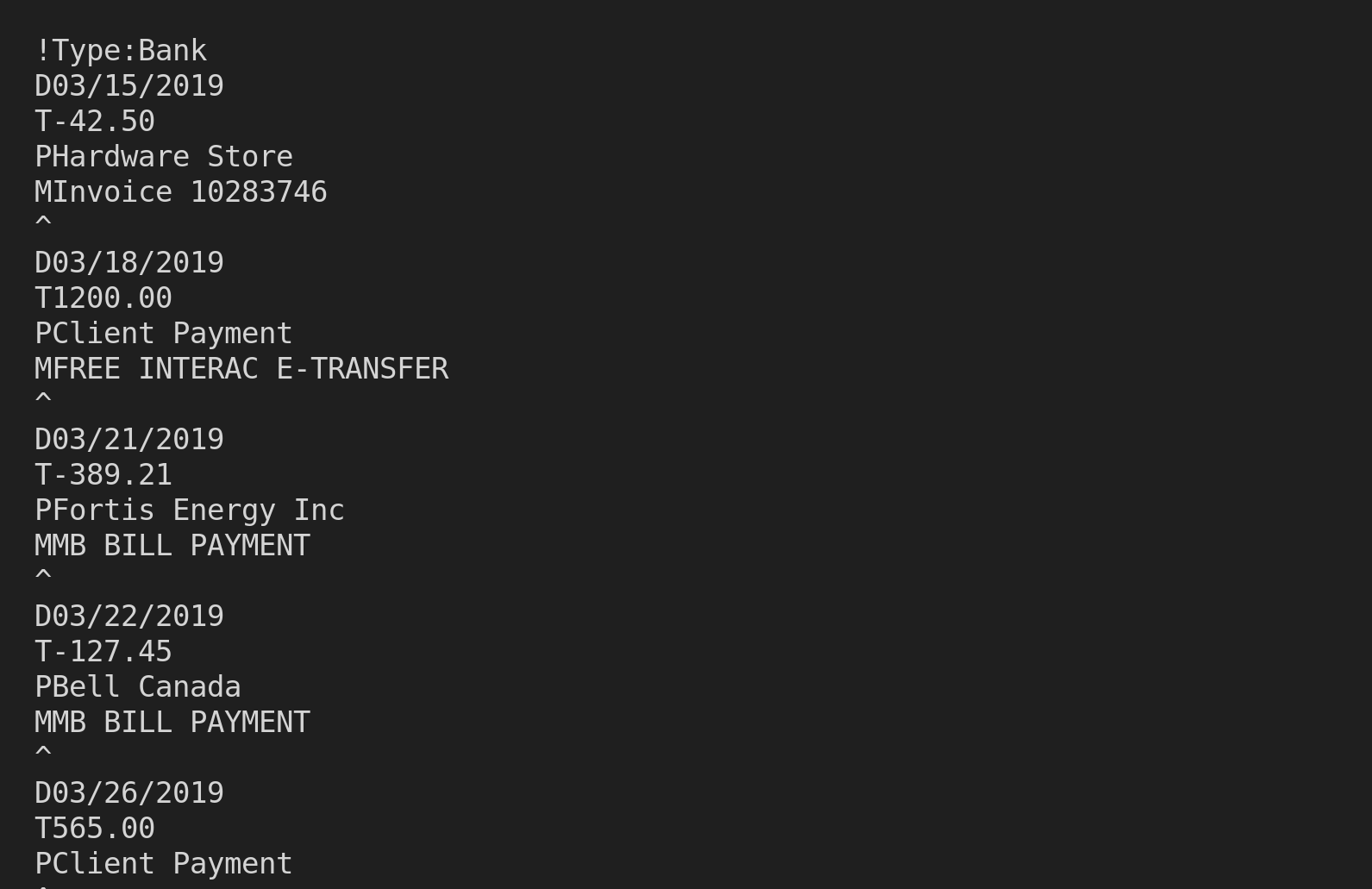
What's inside a QIF file:
Ledger Tome reads the date, amount, payee, and memo, joining the payee and memo into one complete description so no text is lost. Category and check number lines are not carried into the QFX. Quicken will apply its own categorization rules to the imported transactions, which is where those rules already live. If the archive was written by Ledger Tome, its running balances are recognized from the memo convention and restored.
Because QIF records no date layout and no currency, you state both once at import. If you know the opening balance for the period, entering it reconstructs a running balance down the whole file and derives the closing figure, which makes the imported history far easier to check against a statement.
!Type:Bank
D01/15/2024
PCoffee Shop
T-4.50
^
D01/16/2024
PClient Payment
T900.00
^
Moving to QuickBooks rather than staying on Quicken? See QIF to QBO . Just want to read the archive first? See QIF to CSV .
Common Ways to Get a QIF Archive Into Modern Quicken
Import the QIF Directly
Worth attempting once. Depending on your version and the account type, Quicken may refuse it outright or accept it into a limited set of account kinds.
Install the Old Quicken and Convert
Find era-appropriate software, a machine that runs it, and a working upgrade path through several intermediate versions. Occasionally successful, rarely quick.
Retype the History
Guaranteed to work and guaranteed to take days for a real archive.
Automated QIF to QFX Conversion
Reads the archive directly and writes a Web Connect file modern Quicken accepts. Free to start.
QIF to QFX: Method Comparison
| Method | Time Required | Accuracy | Best For | Cost |
|---|---|---|---|---|
| Direct QIF import | Instant, when allowed | Native | Account types Quicken still permits | Free |
| Old Quicken chain | Hours to days | Varies by chain | Determined archivists | Old licenses |
| Retyping | Days for a real archive | Human error rate | Very small archives | Your time |
| Ledger Tome | Under a minute | Field-faithful, dates confirmed | Any QIF archive | Free to start |
Why automated conversion wins: the archive does not need to be recreated, only re-wrapped in the format the current software accepts.
How Ledger Tome Converts QIF to QFX
Ledger Tome parses QIF records natively and writes the Web Connect file Quicken expects.
Upload
Upload your .qif archive
Record Parsing
Dates, amounts, payees, and memos read from the record structure
Confirm & Review
State the date layout and currency, then check every transaction
Download QFX
A Web Connect file ready for Quicken import
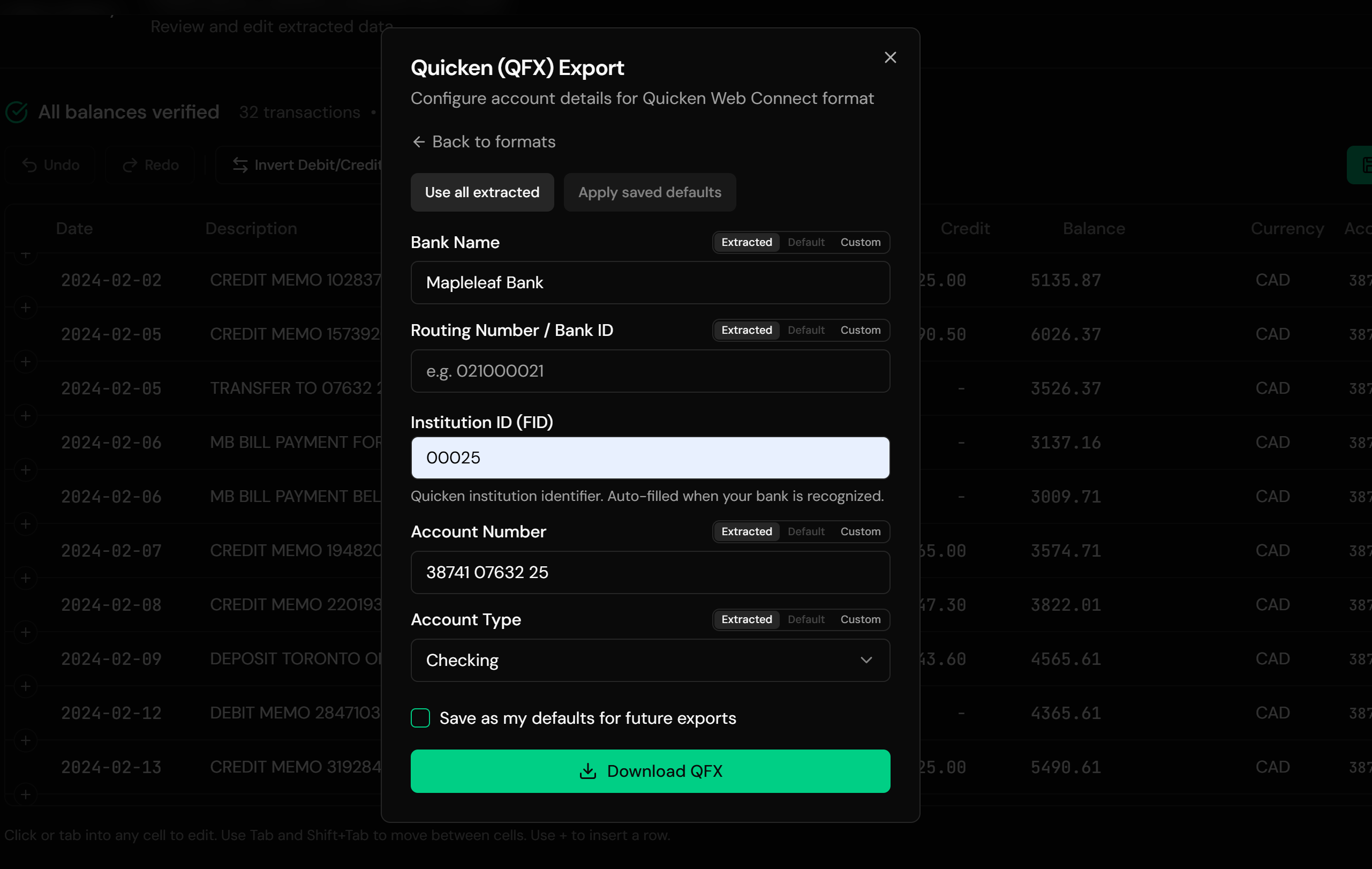
The QFX carries Intuit's institution identification, filled from the bank name where we can resolve it and editable when you need a specific value. Every transaction gets a stable transaction ID built from its date and position, so re-importing the same file will not double your register. Credit card archives are recognized from the type header and treated accordingly.
From Legacy Archive to a File Quicken Accepts
Before: raw QIF file
After: Quicken-ready QFX
Use Cases
Upgrading After Years on an Old Version
A decade of records following you into the current Quicken.
Restoring an Archive on a New Machine
The files survived the hardware; the old software did not.
Consolidating Discontinued Software
Records from Microsoft Money or another retired tool, merged into Quicken.
Rebuilding a Lost Data File
Reconstructing a register from the exports that outlived it.
Bringing In a Second Household's Records
Combining finances and combining files.
Long-Run Reporting
Getting full history into one place so Quicken's reports actually cover it.
Who It's For
Long-Time Quicken Users
Upgrading and unwilling to leave their history behind.
Microsoft Money Refugees
Whose exports need a modern home.
Anyone Restoring an Old Backup
Financial records recovered from an old machine.
People Consolidating Accounts
Several archives into one register.
Accountants Handed an Archive
Client history in a format from another era.
Anyone Holding a .qif File
The data is yours; the format should not be the obstacle.
Related Converters
Ledger Tome reads and writes many financial formats. Choose the one that fits your workflow:
Moving to QuickBooks Desktop instead of Quicken.
Reading the archive in a spreadsheet first.
The other direction, for QIF-only software.
Statements you only have on paper or as PDFs.
The full Quicken import guide.
What Ledger Tome Does Not Do
For clarity and transparency, Ledger Tome does not:
- Access bank accounts directly
- Initiate or modify transactions
- File taxes or submit reports
- Replace accounting software
- Categorize transactions automatically
It focuses solely on converting statement data into structured, accounting-ready formats.
Security & Privacy
Your Financial Data is Protected
We take statement security seriously. Here's how we protect your data:
-
Encrypted Transmission
All uploads use 256-bit SSL encryption (the same security banks use)
-
Secure Processing
Files are processed in isolated, secure environments with no human access
-
Automatic Deletion
All uploaded files are permanently deleted after 7 days (or immediately upon request)
-
No Training Data
Your statements are never used to train AI models or shared with third parties
-
No Account Access
We never access your bank account directly or store your banking credentials
-
GDPR Compliant
Full compliance with data protection regulations
-
No Permanent Storage
We don't maintain a database of your financial information
Privacy First: We process your data solely for conversion purposes. No marketing, no data selling, no third-party sharing.
Frequently Asked Questions
Why won't Quicken import my QIF file?
How do I convert QIF to QFX?
Why does it ask me for the date format?
Do my categories come across?
Will importing the same file twice duplicate my register?
My archive is from Microsoft Money. Does that work?
My file has several accounts in it.
What about the bank identification Quicken asks for?
Will I get running balances?
Some records were skipped.
The files are from the 1990s. Does age matter?
How much does it cost?
Troubleshooting Common Issues
Dates look wrong after import
The layout chosen at import did not match how the archive was written. Re-import with the other layout. A transaction you can independently date is the fastest way to tell which is right.
Quicken rejected the QFX
Check the .qfx extension survived the download. If Quicken objects to the financial institution, set a specific identification value at export rather than leaving the fallback.
Transactions landed in the wrong account
Quicken matches on the account identification in the file. Confirm the target account during import rather than letting it default.
Fewer transactions than expected
Check the skipped-record warning. Records without a parseable date are excluded rather than guessed at.
Amounts have the wrong sign
Check whether the archive is a credit card file. The preview shows the interpreted sign per transaction and anything can be corrected there.
Summary
Quicken closed the QIF door a long time ago, which leaves a lot of people holding their own financial history in a format their current software will not read. The records themselves are fine. What they need is the context QIF never stored, stated once, and a Web Connect wrapper Quicken recognizes.
If you have QIF archives that need to reach the Quicken you run today, Ledger Tome converts them in under a minute.
Ready to Bring Your History Into Quicken?
Stop leaving years of records in a format your software refuses. Convert your first QIF archive to QFX in minutes.
Used by Quicken upgraders, Microsoft Money refugees, and anyone restoring an archive