QIF files tend to turn up rather than get created. A folder recovered from an old machine, an export made when someone left Quicken years ago, a backup from Microsoft Money that outlived Microsoft Money. The data inside is complete and perfectly readable by a program, but the program that read it is not on any computer you own. Ledger Tome opens the file and gives you the transactions as CSV or Excel, one row each.
What makes QIF awkward is not complexity. The format is simple, almost too simple: single-letter codes, one small block per transaction. The awkwardness is what it leaves out. A QIF file does not say what currency it is in, does not carry an account number, and, most consequentially, does not record which date layout it used. A line reading D03/04/1998 is either March 4th or April 3rd and the file will never tell you. Anything reading it has to be told.
This page explains what a QIF file holds, what it deliberately does not, and how to get the contents into a spreadsheet with the dates the right way around.
Why QIF Files Are Hard to Open Today
The format outlived most of the software that used it:
The original program is gone
Microsoft Money is discontinued. Old Quicken versions do not run on current systems. The file format survived its readers.
It states no date format
Nothing inside says whether 03/04 means March or April. Every reader has to guess, and guesses differ by locale.
No currency, no account number
QIF records transactions, not context. Which account and which currency lived in the software, not in the file.
Excel won't open it
It is not delimited text and not a spreadsheet. Excel's import wizards produce a column of single-letter codes, not transactions.
Everything you need is in the file. What's missing is the context the original program kept elsewhere, and that only has to be stated once.
What Is a QIF File?
QIF, the Quicken Interchange Format, is a plain-text transaction format from the era before standardized bank downloads. Quicken, Microsoft Money, and a generation of personal finance tools all read and wrote it.
You typically hold one because it was the export offered when you left a program, because a bank's download page listed QIF among its options, or because an old backup surfaced. QIF stayed common long after better formats existed, which is why archives of it are still turning up now.
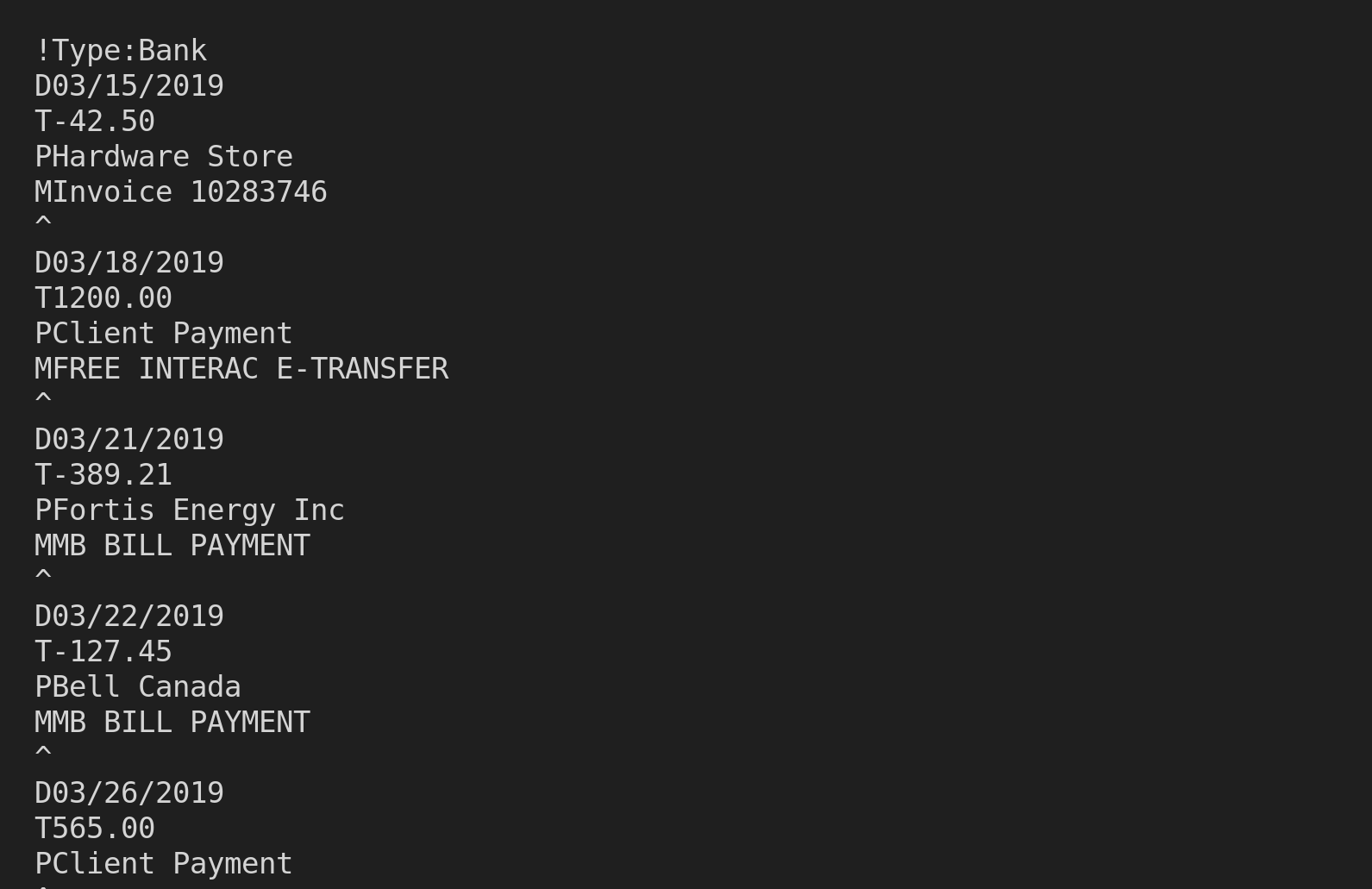
What's inside a QIF file:
Ledger Tome reads the date, amount, payee, and memo, and joins the payee and memo into one full description so nothing in the text is lost. Category and check number lines are not carried into the output. If the file was written by Ledger Tome, its running balances are recognized from the memo convention and restored into a proper balance column.
!Type:Bank
D01/15/2024
PCoffee Shop
T-4.50
^
D01/16/2024
PClient Payment
T900.00
^
Need to go the other direction, into QIF? See CSV to QIF , Excel to QIF , and PDF to QIF .
Common Ways to Read a QIF File
Open It in a Text Editor
Works, in the sense that you will see the contents. A thousand transactions as stacked single-letter codes is not something you can analyze.
Install Old Software
Tracking down a copy of Quicken from the right era, on a system that still runs it, to read a file. Occasionally possible, rarely worth it.
Rename It to .csv
QIF is not delimited text. Renaming produces a single column of codes and no transactions.
Automated QIF Conversion
Parses the record structure natively, joins split descriptions, and asks once for the date layout the file never stated. Free to start.
QIF to CSV: Method Comparison
| Method | Time Required | Accuracy | Best For | Cost |
|---|---|---|---|---|
| Text editor | Instant | Read-only squinting | Confirming file contents | Free |
| Legacy software | Hours, if it works at all | High, if you find a copy | Nothing practical | Varies |
| Rename to .csv | Instant | Produces nothing usable | Nothing | Free |
| Ledger Tome | Under a minute | Field-faithful, dates confirmed | Any QIF archive | Free to start |
Why automated conversion wins: the file is readable, it just needs a reader that still exists and one answer about how its dates were written.
How Ledger Tome Converts QIF to CSV
Ledger Tome parses QIF records natively and turns them into clean spreadsheets.
Upload
Upload your .qif file
Record Parsing
Dates, amounts, payees, and memos read from the record structure
Confirm & Review
State the date layout and currency, then check every transaction
Download CSV or Excel
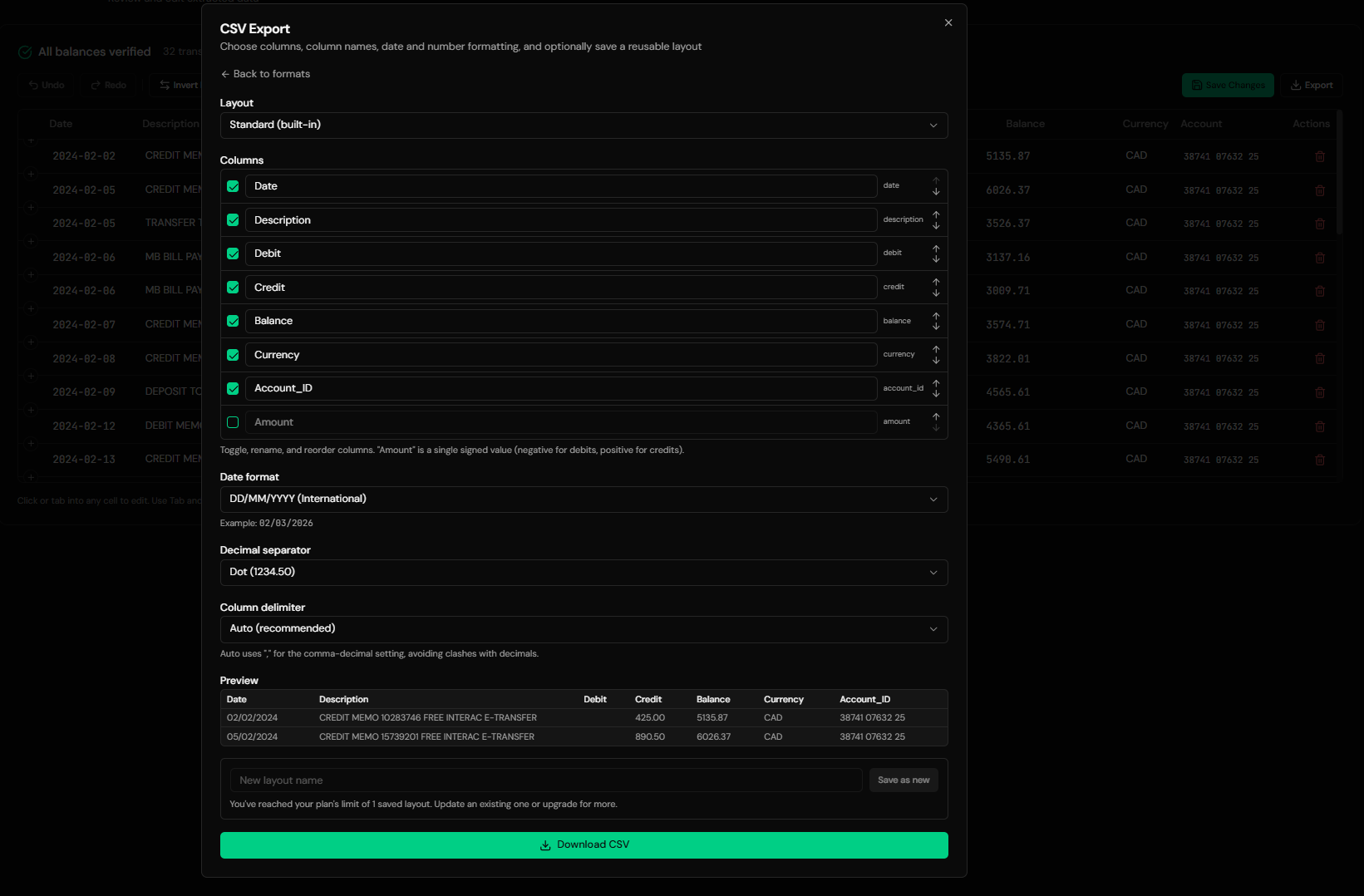
One row per transaction, ready for analysis
Payee and memo are joined into complete descriptions. Credit card files are recognized from the type header. Records without a usable date are skipped and counted in a warning rather than being placed at a guessed date. If you know the opening balance, entering it reconstructs a running balance down the whole file and derives the closing figure.
From Legacy Records to a Clean Spreadsheet
Before: raw QIF file
After: clean spreadsheet
Use Cases
Opening an Old Archive
Files from Quicken or Microsoft Money, readable again without the original program.
Tax and Records Requests
Producing history from an archive when someone official asks for it.
Analyzing Long-Run History
Decades of records in a spreadsheet, where trends are actually visible.
Estate and Account Administration
Reading the financial records of an account you have inherited responsibility for.
Migrating Into Modern Software
Read the archive, check it, then export to a current format.
Just Seeing What's In It
Sometimes the question is only whether the file is worth keeping.
Who It's For
Former Quicken Users
Whose exports outlasted their subscription.
Microsoft Money Refugees
The program is gone; the files are not.
Anyone Restoring an Old Backup
Financial records recovered from an old machine.
Accountants Handed an Archive
Client history in a format from another era.
Executors & Administrators
Reconstructing records that came with a responsibility.
Anyone Holding a .qif File
If you did not choose the format, you should not need the software.
Related Converters
Ledger Tome reads and writes many financial formats. Choose the one that fits your workflow:
The modern Quicken Web Connect equivalent.
Generic OFX bank downloads into spreadsheets.
The other direction: spreadsheet data into QIF.
Old archives into modern Quicken.
PDF statements into Excel.
What Ledger Tome Does Not Do
For clarity and transparency, Ledger Tome does not:
- Access bank accounts directly
- Initiate or modify transactions
- File taxes or submit reports
- Replace accounting software
- Categorize transactions automatically
It focuses solely on converting statement data into structured, accounting-ready formats.
Security & Privacy
Your Financial Data is Protected
We take statement security seriously. Here's how we protect your data:
-
Encrypted Transmission
All uploads use 256-bit SSL encryption (the same security banks use)
-
Secure Processing
Files are processed in isolated, secure environments with no human access
-
Automatic Deletion
All uploaded files are permanently deleted after 7 days (or immediately upon request)
-
No Training Data
Your statements are never used to train AI models or shared with third parties
-
No Account Access
We never access your bank account directly or store your banking credentials
-
GDPR Compliant
Full compliance with data protection regulations
-
No Permanent Storage
We don't maintain a database of your financial information
Privacy First: We process your data solely for conversion purposes. No marketing, no data selling, no third-party sharing.
Frequently Asked Questions
How do I open a QIF file without Quicken?
Can I convert QIF to Excel instead of CSV?
Why does it ask me for the date format?
Do categories come across?
What columns does the output contain?
Will I get running balances?
Are credit card QIF files handled?
My file has several accounts in it. What happens?
Some records were skipped.
The file is from the 1990s. Does age matter?
Can I turn the QIF into a modern format instead?
How much does it cost?
Troubleshooting Common Issues
Dates look wrong in the output
The date layout chosen at import did not match how the file was written. Re-import with the other layout. A transaction you can independently date is the fastest way to tell which is right.
File isn't recognized
Confirm it is really QIF: it should start with a !Type: line and use single-letter codes with ^ separators. Some tools label other exports as QIF.
Descriptions look merged
That is intentional. Payee and memo are joined so no text is lost. Edit them in the preview if you want them shorter.
No balance column
Expected unless the file carried balances or you supplied an opening balance. Enter the opening balance at import to reconstruct them.
Fewer rows than expected
Check the skipped-record warning. Records without a parseable date are excluded rather than guessed at.
Summary
QIF archives hold complete transaction history in a format whose software has mostly disappeared, and whose deliberate silence about dates and currency is what makes casual conversion risky. Reading the records natively and stating the date layout once turns a file nothing on your computer opens into an ordinary spreadsheet.
If you have QIF files you need to actually read, Ledger Tome converts them in under a minute each.
Ready to Read Your QIF Archive?
Stop needing software from another decade to see your own records. Convert your first QIF file to CSV or Excel in minutes.
Used by former Quicken and Money users, accountants, and anyone restoring an old archive