Plenty of real bookkeeping lives in Excel. A workbook with a tab per year, a running balance down column E, and a decade of transactions typed in by hand. It works fine until the day it needs to be inside accounting software, and the software asks for a QIF file. Ledger Tome reads the workbook and writes the QIF, with one record per transaction and dates in the layout your target program expects.
The trap in this conversion is dates, and it is a quiet one. Excel stores dates as numbers and shows them however your regional settings decide, so a column that reads 03/04/2026 on your screen is not telling you whether it means March 4th or April 3rd. QIF makes it worse: the format carries no marker saying which layout it used, so the importing program guesses using its own locale. Two guesses in a row is how a year of records lands with every month and day reversed.
This page covers what QIF can and cannot carry, why spreadsheet dates are the thing that breaks, and how to convert a workbook without inheriting either problem.
Why Spreadsheets Don't Become QIF Files Cleanly
The two formats disagree about almost everything:
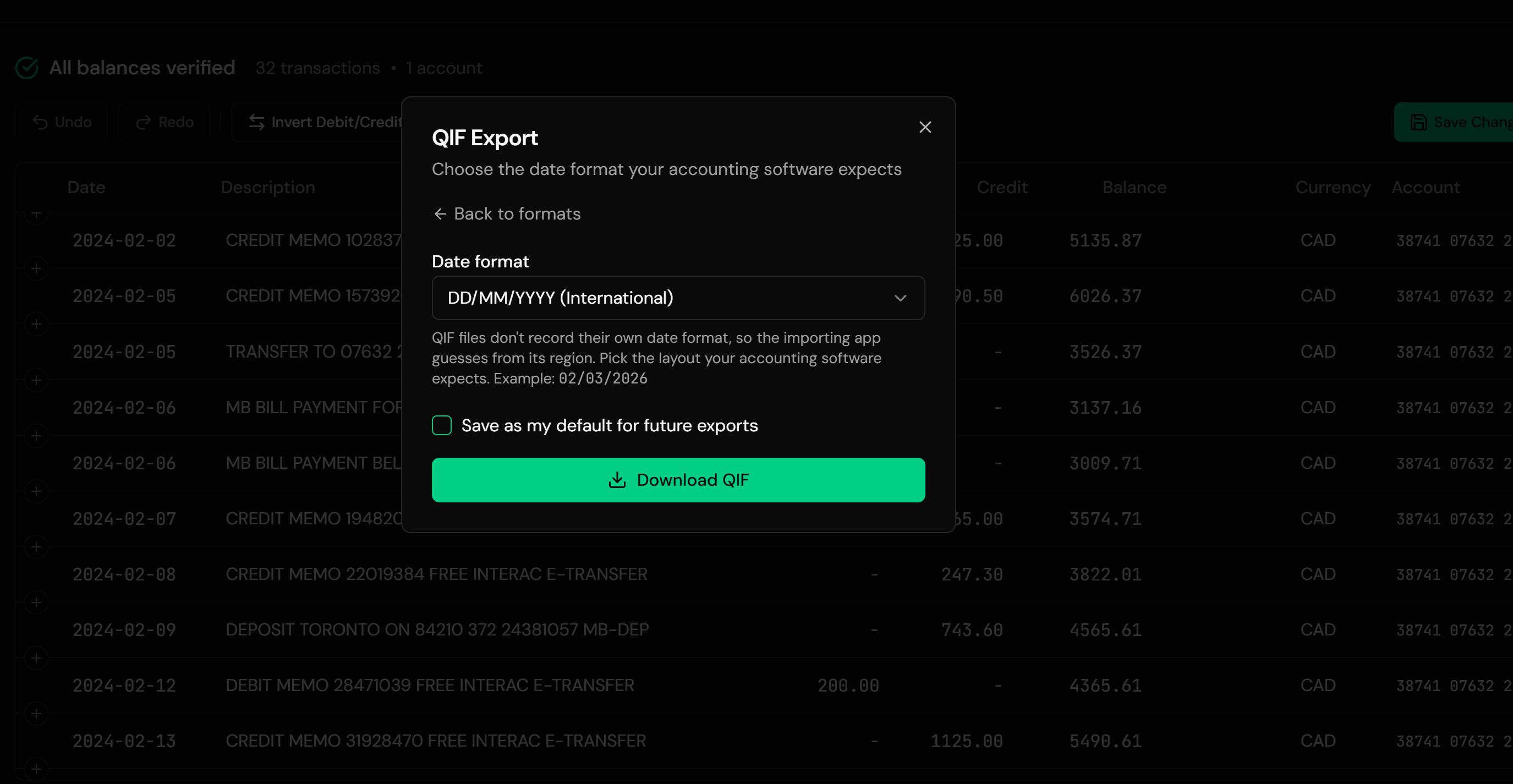
QIF states no date format
Nothing inside a QIF file says whether 03/04 is March 4th or April 3rd. The importing program decides using its own locale, and it never asks.
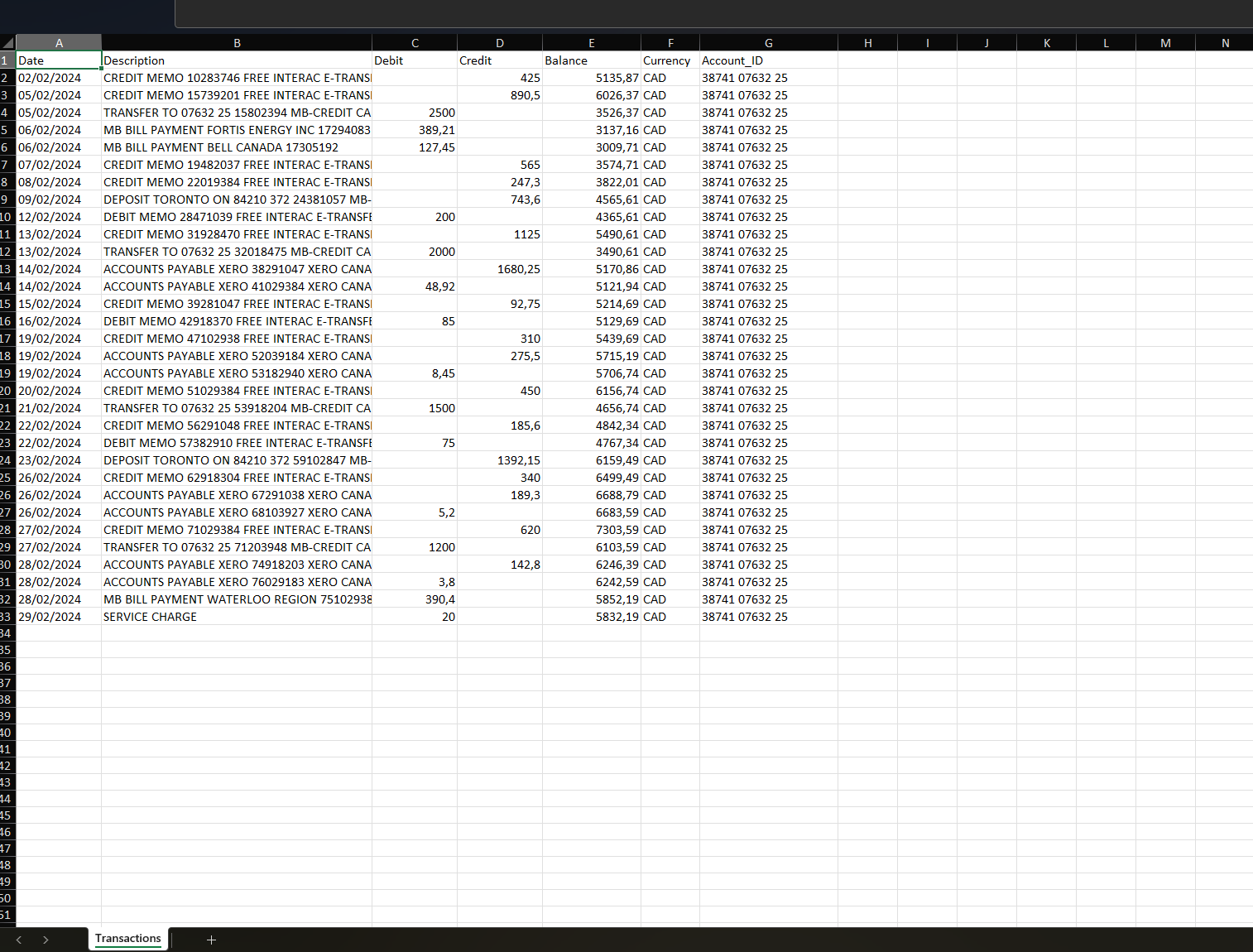
Excel dates are numbers wearing a costume
Your workbook stores a serial number and displays it by regional setting. What you see is not what a converter reads unless it handles both.
Every workbook is shaped differently
Debits and credits in one column or two, headers three rows down, subtotals, blank spacer rows, a notes column someone added in 2019.
QIF is a plain-text record format
Each transaction is a small block of single-letter codes closed with a caret. Producing it by hand for hundreds of rows is not realistic.
The data in the workbook is complete. Getting it into QIF is a question of reading the sheet correctly and then being explicit about the date layout.
What Is a QIF File?
QIF, the Quicken Interchange Format, is a plain-text transaction format that predates the modern statement standards and is still the only file import some software offers.
You end up needing one because your target program asks for it. Quicken 2004 and earlier read QIF rather than QFX. MYOB accepts QIF alongside OFX. GnuCash and HomeBank both import it. A long tail of older and simpler finance tools treat QIF as their only file-based way in. It is not a modern format, but it is a widely accepted one.
What's inside a QIF file:
QIF is a narrow format. It carries the date, the amount, the payee, and a memo. It does not carry currency, an account number, or a statement period. Ledger Tome does not write category, check number, or split lines, so a converted file gives your software clean transactions to work with rather than a pre-sorted chart of accounts. Categorization happens in the destination program, which is where its rules live anyway.
!Type:Bank
D01/15/2024
PCoffee Shop
T-4.50
^
D01/16/2024
PClient Payment
T900.00
^
Working from a bank export instead of your own workbook? See CSV to QIF . Starting from the original statement PDF? See PDF to QIF .
Common Ways to Get a Spreadsheet Into QIF
Retype It Into the Software
Open the workbook beside the program and key every row in. Accurate if you are careful, and the reason people search for this conversion in the first place.
Save as CSV and Hope
Most programs that want QIF do not take CSV, which is the whole problem. Where they do, the date ambiguity is identical and the column mapping is on you.
Write the QIF by Hand
QIF's structure is simple enough to produce in a text editor for ten transactions. For a decade of records it is a data-entry project with a new way to make mistakes.
Automated Excel to QIF Conversion
Reads the workbook natively including multi-sheet files and Excel date serials, then writes valid QIF in the date layout you choose. Free to start.
Excel to QIF: Method Comparison
| Method | Time Required | Accuracy | Best For | Cost |
|---|---|---|---|---|
| Retyping | Hours per year of records | Human error rate | Very small ledgers | Your time |
| CSV instead | Blocked | Usually not accepted | Software that takes CSV | Free |
| Hand-written QIF | Hours, plus debugging | Fragile | A handful of rows | Free |
| Ledger Tome | Under a minute | Explicit date handling | Any workbook layout | Free to start |
Why automated conversion wins: it reads the dates as dates rather than as text that looks like dates, and it lets you state the output layout instead of leaving it to two programs' guesses.
How Ledger Tome Converts Excel to QIF
Ledger Tome reads spreadsheets the way a person does, then writes QIF the way importers expect.
Upload
Upload your .xlsx or .xls workbook
Structure Detection
Sheets, header rows, debit and credit columns, and date serials identified automatically
Review & Choose Date Format
Check the transactions and pick the date layout your target software expects
Download QIF
A valid QIF file, one record per transaction
Native Excel dates are read as real dates rather than as displayed text, so regional formatting never changes the result. Where a date column is genuinely ambiguous, you are asked to choose rather than having a guess made for you. Blank rows, subtotals, and other non-transaction lines are dropped.
From Workbook Rows to Importable Records
Before: transaction workbook
After: QIF ready for import
Use Cases
A Hand-Kept Ledger Going Into Software
Years of a personal workbook loaded into Quicken or GnuCash in one pass.
Client Spreadsheets
The client keeps books in Excel; the practice needs them in the accounting file.
Migrating Off Spreadsheets
The point where a growing business finally moves into real software, without abandoning its history.
Software That Only Reads QIF
Older Quicken versions and simpler tools where QIF is the only import.
Rebuilding After a Gap
A period reconstructed in Excel, then loaded to fill the hole in the books.
MYOB and GnuCash Imports
Both accept QIF, and both care about the date layout you choose.
Who It's For
Spreadsheet Bookkeepers
People whose actual books are a workbook.
Quicken Users
Especially on versions that read QIF rather than QFX.
MYOB Users
Australian and New Zealand businesses feeding files rather than statements.
GnuCash & HomeBank Users
Free-software finance tools with QIF import.
Accountants Receiving Workbooks
Client records arriving as spreadsheets, needing to land in software.
Anyone Migrating Off Excel
Taking the history along rather than starting fresh.
Related Converters
Ledger Tome reads and writes many financial formats. Choose the one that fits your workflow:
The bank-export version of this page.
Starting from the original statement PDF.
The other direction: reading QIF files in a spreadsheet.
Same workbook, QuickBooks Desktop output.
Same workbook, OFX for Xero, Sage, and MYOB.
What Ledger Tome Does Not Do
For clarity and transparency, Ledger Tome does not:
- Access bank accounts directly
- Initiate or modify transactions
- File taxes or submit reports
- Replace accounting software
- Categorize transactions automatically
It focuses solely on converting statement data into structured, accounting-ready formats.
Security & Privacy
Your Financial Data is Protected
We take statement security seriously. Here's how we protect your data:
-
Encrypted Transmission
All uploads use 256-bit SSL encryption (the same security banks use)
-
Secure Processing
Files are processed in isolated, secure environments with no human access
-
Automatic Deletion
All uploaded files are permanently deleted after 7 days (or immediately upon request)
-
No Training Data
Your statements are never used to train AI models or shared with third parties
-
No Account Access
We never access your bank account directly or store your banking credentials
-
GDPR Compliant
Full compliance with data protection regulations
-
No Permanent Storage
We don't maintain a database of your financial information
Privacy First: We process your data solely for conversion purposes. No marketing, no data selling, no third-party sharing.
Frequently Asked Questions
How do I convert an Excel file to QIF?
Which date format should I choose?
Do my categories come across?
Will running balances be preserved?
My workbook has a tab per year. Does that work?
My sheet has debits and credits in separate columns.
Does it handle .xls as well as .xlsx?
What about subtotal rows and blank spacers?
Can I edit the data before downloading?
Can I export something other than QIF from the same upload?
How much does it cost?
Troubleshooting Common Issues
Dates came out reversed after import
The date layout chosen at export did not match what the importing program assumed. Re-export with the other layout, or use YYYY-MM-DD where your software accepts it, since it cannot be misread.
The importer rejected the file
Confirm the .qif extension survived the download and that you chose the right account type. Some programs also require the QIF to be imported into an account of a matching kind.
Row count looks short
Subtotals, blank rows, and header repeats are dropped by design. Compare the preview count against the actual transaction rows rather than the sheet's total row count.
Amounts have the wrong sign
Some sheets record money out as positive. The preview shows the interpreted sign per transaction; correct the convention there before exporting.
A column was read as the wrong field
Adjust the mapping in the preview. Unusual header names and columns added over the years are the usual cause.
Summary
A spreadsheet holds complete records in a shape no accounting program will import, and QIF is the format many of them ask for. The conversion itself is mechanical; the risk is dates, because Excel hides its real values behind regional display and QIF states no format at all. Converting with an explicit date choice removes both guesses at once.
If you have a workbook that needs to become a QIF file, Ledger Tome converts it in under a minute.
Ready to Convert Your Spreadsheet?
Stop retyping a workbook into your accounting software. Convert your first Excel file to QIF in minutes.
Used by spreadsheet bookkeepers, Quicken users, and MYOB and GnuCash users