Your accounting software asked for a camt.053 file. Your bank gave you a PDF. That mismatch is increasingly common: European software is standardizing on ISO 20022 statements, Swiss packages already expect them, and Odoo imports them natively, while banks still deliver PDFs for anything historical, secondary, or consumer-tier. Our converter reads the PDF and produces a valid CAMT.053 XML file your software imports directly.
Validity is the hard part, and it's specific. A CAMT.053 needs correct opening and closing balance blocks, unsigned amounts with separate direction indicators, and a bank transaction code on every entry, an element some importers read without checking it exists. Ledger Tome's output includes all of it: balances carried from the statement so opening plus entries reconciles to closing, and a complete transaction code structure on every entry so strict parsers don't break.
This page explains what the format requires, which software wants it, and how the conversion works from any bank's PDF.
Why Producing a Valid CAMT.053 Is Harder Than It Looks
ISO 20022 is precise, and importers assume that precision:
Schema-strict importers
ERPs parse CAMT files against the ISO schema. Missing elements, like the mandatory bank transaction code, crash imports with unhelpful errors.
Balances must reconcile
The file states opening and closing balances, and good importers verify the entries add up between them. Hand-built files rarely survive that check.
Signs are indirect
Amounts are unsigned; direction lives in a separate indicator per entry. One inverted flag and every debit becomes a credit.
PDFs weren't built for extraction
Statement layouts vary by bank, split descriptions across lines, and hide structure in visual formatting.
The conversion has to be right at both ends: faithful extraction from the PDF, schema-valid construction of the XML.
Works With Banks Across Switzerland, Germany, and the Nordics
Ledger Tome's AI-powered converter reads bank and credit card statements from:
Swiss Banks
UBS, PostFinance, Raiffeisen, Zürcher Kantonalbank and other cantonal banks
German Banks
Deutsche Bank, Commerzbank, Sparkassen, Volksbanken, DKB, N26
Nordic Banks
Nordea, Danske Bank, SEB, Handelsbanken, DNB
International
100+ banks worldwide, including non-English and non-German statements
Don't see your bank? The AI adapts to any statement layout automatically.
What Is a CAMT.053 File?
CAMT.053 is the ISO 20022 bank-to-customer statement: the XML message replacing SWIFT MT940 as Europe's standard end-of-day statement format.
Why software wants it: the format carries everything a statement import needs, account, currency, opening and closing balances, and typed entries with dates, directions, and remittance information, in one schema every compliant tool parses the same way. Odoo imports it natively, Swiss accounting software treats it as the default, and ERPs like SAP and NetSuite consume it in treasury workflows. Still on MT940-based software? See our PDF to MT940 converter .
Key characteristics of a valid CAMT.053 file:
<Ntry>
  <Amt Ccy="EUR">42.50</Amt>
  <CdtDbtInd>DBIT</CdtDbtInd>
  <Sts>BOOK</Sts>
  <BookgDt><Dt>2026-01-15</Dt></BookgDt>
  <NtryDtls><TxDtls><RmtInf>
    <Ustrd>Invoice 2026-014</Ustrd>
  </RmtInf></TxDtls></NtryDtls>
</Ntry>
Common Ways to Get PDF Statements Into CAMT-Based Software
Manual Entry
Retype the statement into the software. Slow, error-prone, and there's still no statement file for the bank reconciliation flow.
Ask the Bank for CAMT Exports
Business-tier portals sometimes offer it, for recent periods, for that account. Historical statements and consumer accounts stay PDF-only.
Hand-Build the XML
Technically possible with the schema documentation and a free afternoon per statement. Balance blocks and transaction codes make it brittle.
Automated PDF to CAMT.053 Conversion
AI extraction from any statement layout, schema-valid XML out, balances reconciling by construction. Free to start.
PDF to CAMT.053: Method Comparison
| Method | Time Required | Accuracy | Best For | Cost |
|---|---|---|---|---|
| Manual entry | 30-60 minutes per statement | 70-80% (error-prone) | A handful of transactions | Free |
| Bank CAMT export | Minutes | High | Recent periods, business accounts | Free (if offered) |
| Hand-built XML | Hours per statement | Brittle | Nobody, really | Free |
| Ledger Tome | Under a minute | Schema-valid, balance-consistent | Any statement, any bank | Free to start |
Why automated conversion wins: it turns the statements you already have into the format your software is moving to.
How Ledger Tome Converts PDF to CAMT.053
Ledger Tome is an AI-powered tool designed to convert PDF bank and credit card statements into valid ISO 20022 statement files.
Upload
Upload your PDF bank or credit card statement
AI Analysis
Statement structure and layout analyzed automatically
Extract & Validate
Transactions extracted; review everything in the interactive preview
Download CAMT.053
Schema-valid XML with reconciling balances
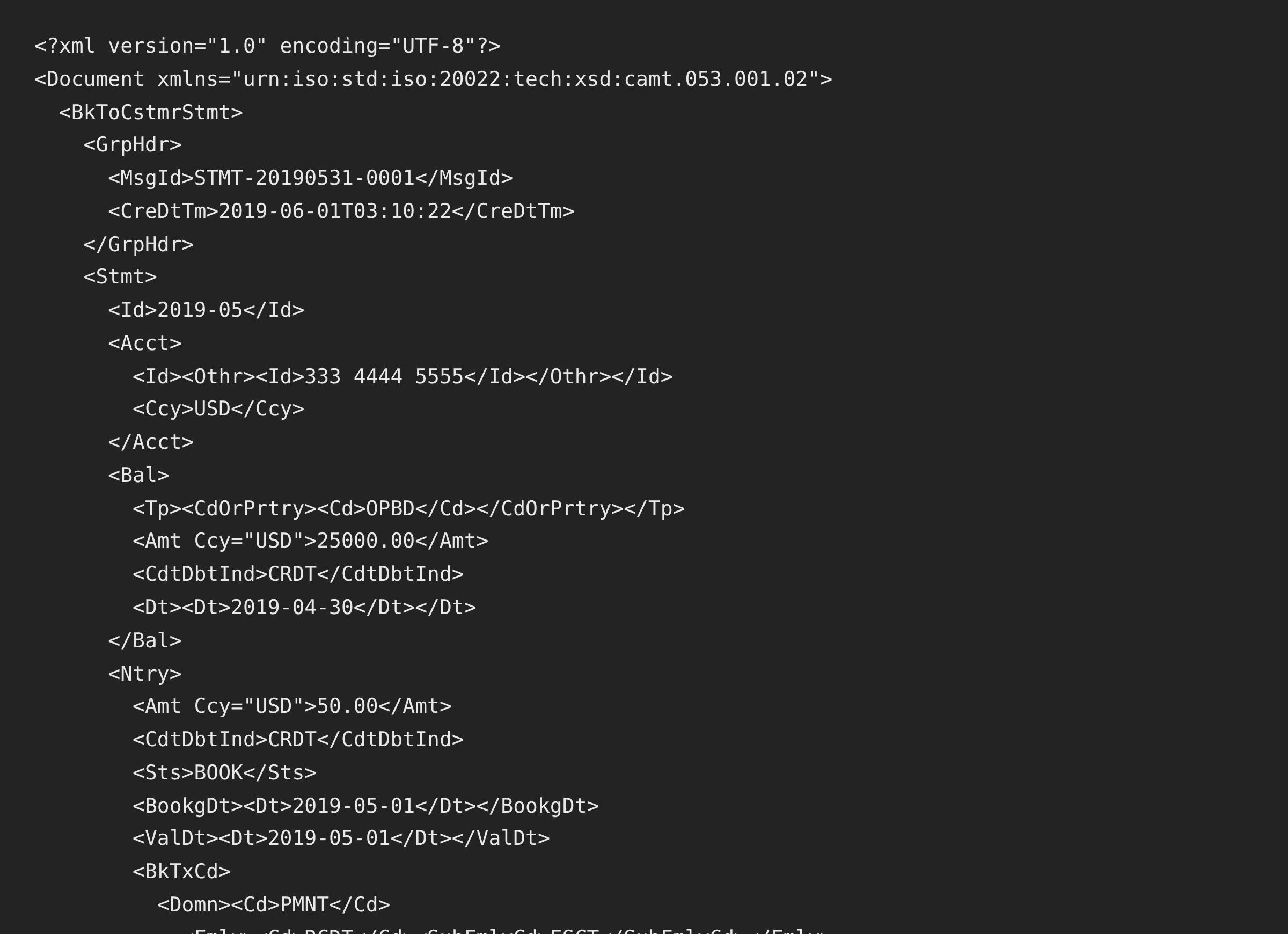
The output is camt.053.001.02 with opening and closing balances carried from the statement, IBAN-aware account identification, and a complete bank transaction code on every entry, the element strict importers index without checking.
From PDF Statement to ISO 20022 XML
Before: Raw PDF
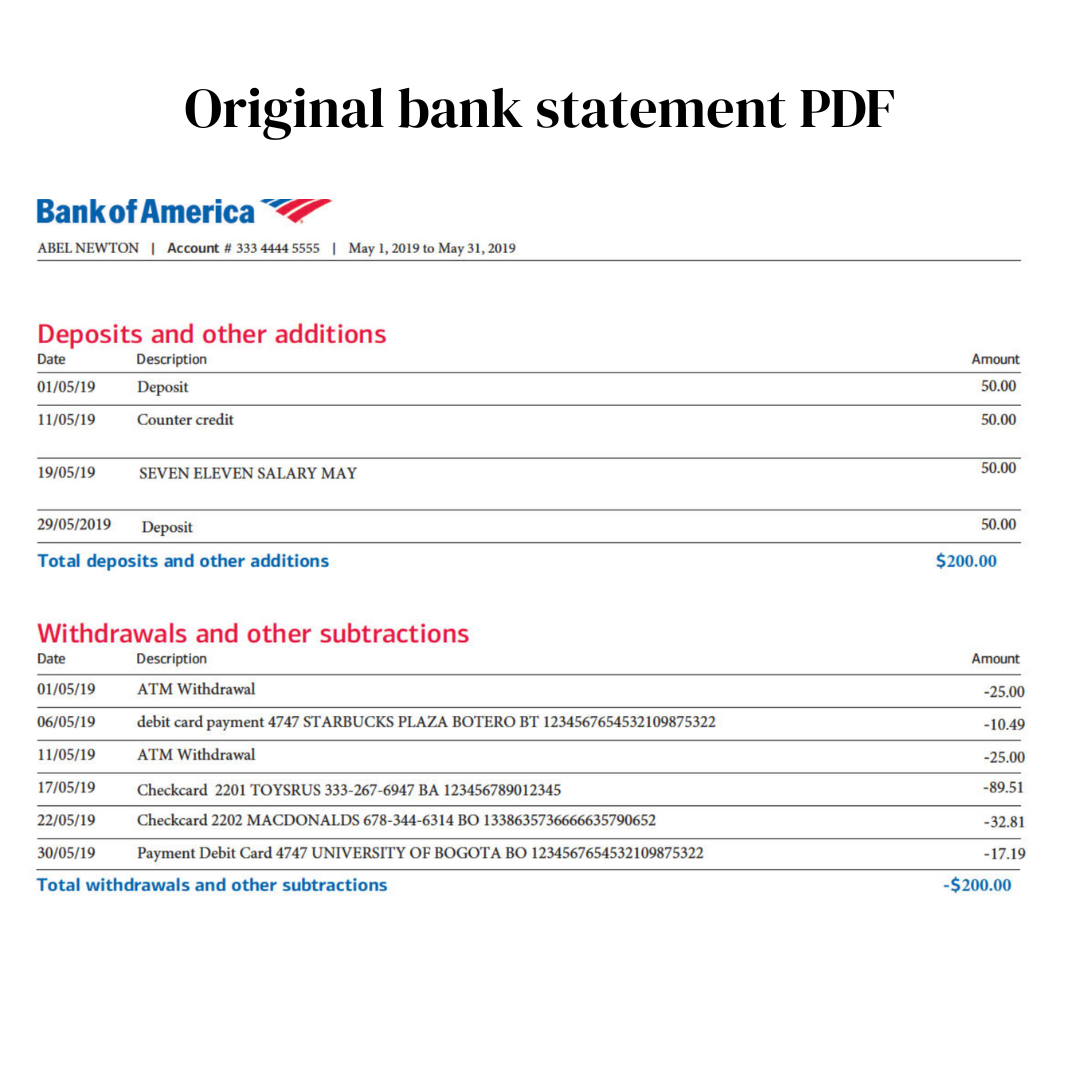
After: Valid CAMT.053
Use Cases for PDF to CAMT.053 Conversion
Odoo Bank Statement Import
Odoo reads CAMT.053 natively; feed it from any bank's PDFs.
Swiss Accounting Software
Where CAMT is already the standard and PDFs still arrive anyway.
Historical Backfill
Bank CAMT exports cover recent months; archives are PDF. Convert the archive.
Foreign and Secondary Accounts
Accounts outside the main bank link, converted into the standard format.
ERP Treasury Feeds
Statement files for SAP, NetSuite, and treasury tools when the bank connection doesn't cover an account.
Client Records at Fiduciaries
Swiss and German practices converting client PDFs into their software's import format.
Who PDF to CAMT.053 Conversion Is For
This type of conversion is commonly used by:
Odoo Users
The open-source ERP crowd with native CAMT import.
Swiss Fiduciaries & Accountants
Treuhand practices standardized on CAMT.
German & Nordic Accountants
Where software is migrating from MT940 to ISO 20022.
ERP & Treasury Teams
Feeding statement pipelines for uncovered accounts.
SMBs on Modern Software
Whose importer asks for a file the bank won't produce.
Anyone Told "We Need a CAMT File"
The sentence that brings people to this page.
Related Converters
Ledger Tome supports multiple input and output formats. Choose the one that fits your workflow:
The SWIFT-format sibling: same conversion, legacy format.
The reverse: reading CAMT files as spreadsheets.
Already have MT940 files? Migrate them to ISO 20022.
The Dutch software guide (MT940 and CAMT).
Spreadsheet output instead.
What Ledger Tome Does Not Do
For clarity and transparency, Ledger Tome does not:
- Access bank accounts directly
- Initiate or modify transactions
- File taxes or submit reports
- Replace accounting software
- Categorize transactions automatically
It focuses solely on converting statement data into structured, accounting-ready formats.
Security & Privacy
Your Financial Data is Protected
We take statement security seriously. Here's how we protect your data:
-
Encrypted Transmission
All uploads use 256-bit SSL encryption (the same security banks use)
-
Secure Processing
Files are processed in isolated, secure environments with no human access
-
Automatic Deletion
All uploaded files are permanently deleted after 7 days (or immediately upon request)
-
No Training Data
Your statements are never used to train AI models or shared with third parties
-
No Account Access
We never access your bank account directly or store your banking credentials
-
GDPR Compliant
Full compliance with data protection regulations
-
No Permanent Storage
We don't maintain a database of your financial information
Privacy First: We process your data solely for conversion purposes. No marketing, no data selling, no third-party sharing.
Frequently Asked Questions
Can I convert any PDF bank statement to CAMT.053?
Which software imports the resulting file?
Which CAMT version does Ledger Tome produce?
Are the balances in the file correct?
My importer complains about missing transaction codes in other tools' files. What about yours?
How is the account identified in the file?
Does this work with credit card statements?
Can I convert scanned statements?
What's the difference between CAMT.053, CAMT.052, and CAMT.054?
Can I review the data before downloading?
How much does it cost?
Troubleshooting Common Issues
The importer rejects the file
Confirm your software expects camt.053 (not 052/054) and re-download with the .xml extension intact. If a specific importer still refuses, contact support with the error.
Balances flagged on import
The source statement's own numbers didn't reconcile (partial or truncated statement). Convert a complete statement period; the preview shows what was extracted.
Scanned statement, poor quality
OCR handles most scans; 300 DPI with readable text gives the best extraction.
Dates look wrong
Usually a source-layout ambiguity. Check the preview against a known transaction before export; CAMT output itself carries unambiguous ISO dates.
Need MT940 instead
Your software may still be on the SWIFT format. Export MT940 from the same preview, or see PDF to MT940 .
Summary
European software is standardizing on ISO 20022 statements while banks keep delivering PDFs, and the CAMT.053 schema is exacting enough that hand-built files rarely import. Automated conversion covers both ends: AI extraction from any statement layout, and schema-valid XML with reconciling balances and complete transaction codes on every entry.
If your software wants camt.053 and your bank gave you a PDF, Ledger Tome converts it in under a minute.
Ready to Convert Your PDF to CAMT.053?
Stop retyping statements into ISO-native software. Convert your first statement to valid CAMT.053 in minutes.
Used by Odoo users, Swiss fiduciaries, and European accounting teams