Banking is migrating from the SWIFT MT formats to ISO 20022, and the migration doesn't wait for your archives. New software reads CAMT.053 only, ERP upgrades switch the expected format mid-year, and suddenly the .sta files your processes produce, or the years of them in storage, need to be XML. Our converter reads MT940 natively and produces valid CAMT.053, one file at a time, in seconds each.
The two formats describe the same thing: an account, an opening balance, entries, a closing balance, so the conversion is a faithful translation, not a reinterpretation. Ledger Tome carries the statement's own balances across (:60F: becomes the OPBD block, :62F: becomes CLBD), joins MT940's wrapped description lines into complete remittance information, and verifies that entries still reconcile to the stated closing balance, warning you when the source file itself doesn't add up.
This page covers what maps to what, where the formats genuinely differ, and how to run the conversion for a single file or a whole archive.
Why This Migration Keeps Landing on Your Desk
The formats are cousins, but the ecosystem is moving and the files don't move themselves:
Software keeps dropping MT940
New releases and new tools increasingly read ISO 20022 only. The .sta files that fed yesterday's importer bounce off today's.
Archives outlive formats
Audit trails, historical rebuilds, and migrations need old statements in the new format, and banks won't re-issue them.
The mapping has real details
Unsigned amounts with direction indicators, balance blocks, mandatory transaction codes: a sloppy translation produces XML that parses and imports wrong.
Hand-conversion doesn't scale
One statement is an afternoon with two specifications open. A folder of them is a project nobody wants.
A correct translation exists for every MT940 file. The point is not doing it by hand.
MT940 to CAMT.053: What Maps to What
The conversion is a structured translation between two descriptions of the same statement:
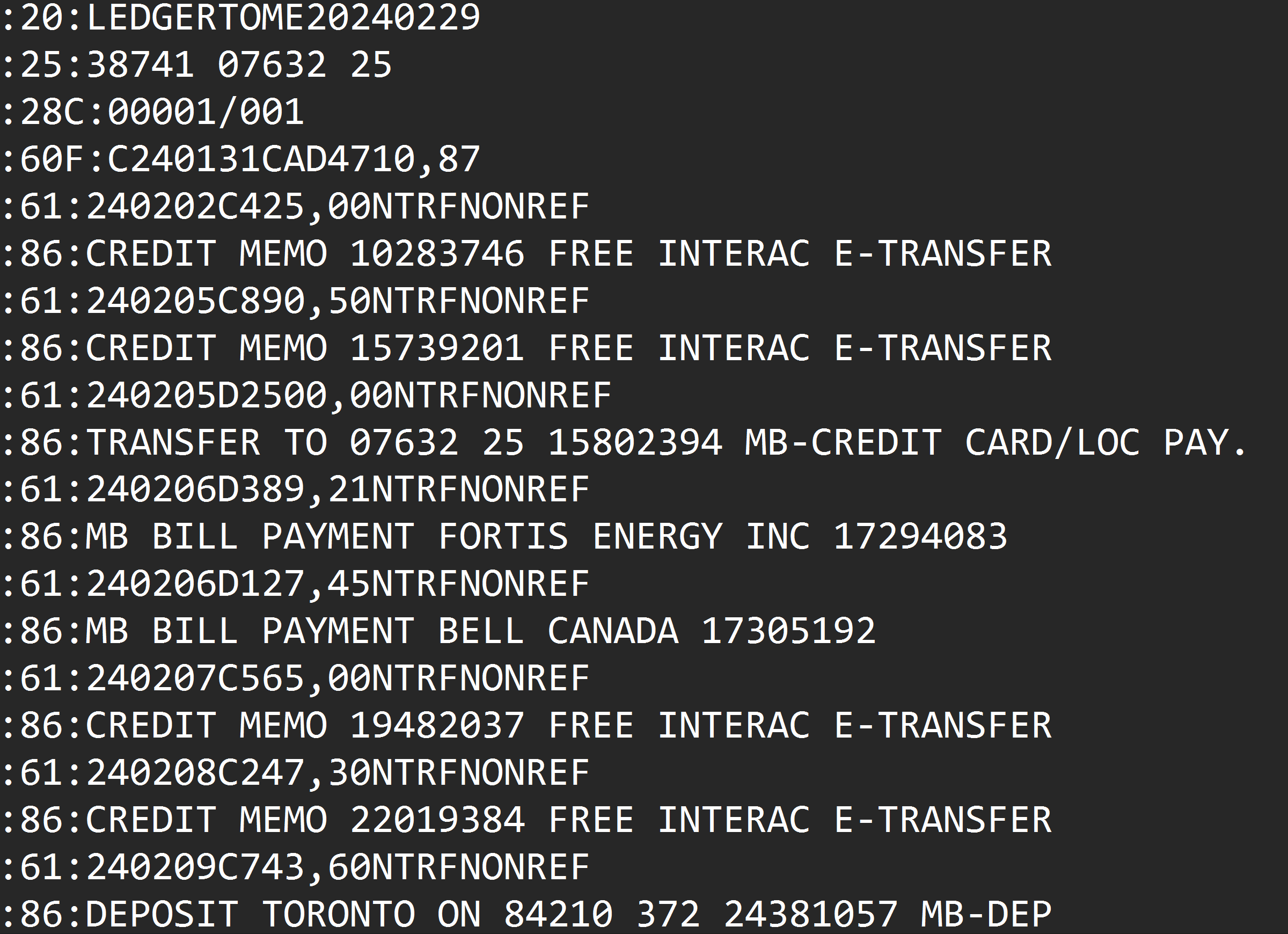
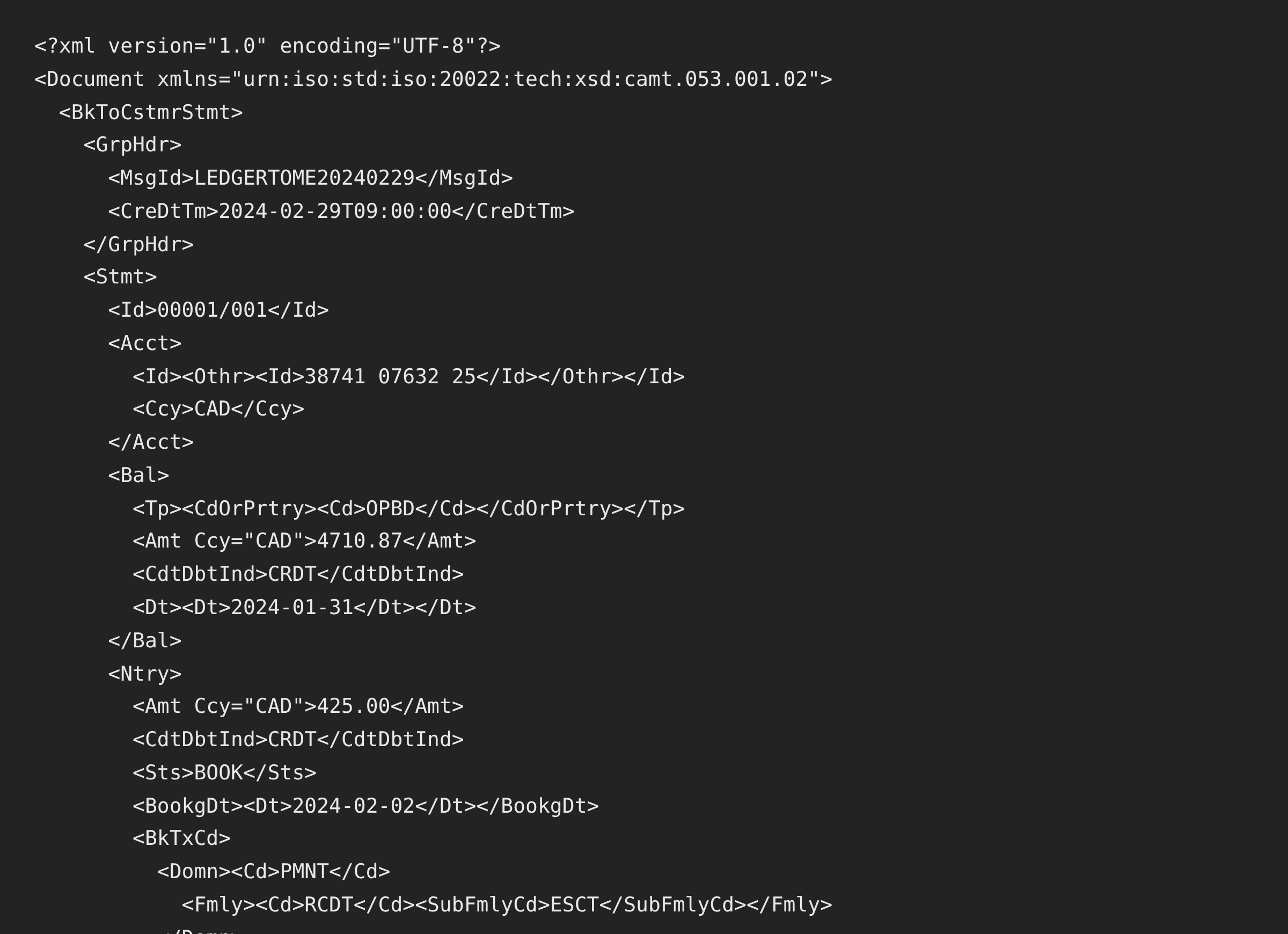
- :25: account identification Acct block, rendered as IBAN when it is one
- :60F: opening balance OPBD balance block with date and currency
- :61: transaction lines one Ntry each: unsigned amount plus a credit/debit indicator, booking and value dates
- :86: description lines (joined across continuations) remittance information on the entry
- :62F: closing balance CLBD balance block
- (added) a complete bank transaction code per entry required by CAMT, never carried by MT940
Where CAMT demands more than MT940 provided, the output supplies valid, honest defaults; where the statement stated facts, those facts carry through untouched.
Need to read the file rather than migrate it? See MT940 to Excel . Starting from PDFs? PDF to CAMT.053 .
Common Ways to Get MT940 Data Into CAMT-Only Software
Ask the Bank for CAMT Re-Delivery
Sometimes possible for recent periods on business accounts. Archives and closed accounts are gone for good.
Hand-Translate the XML
Two specifications, one afternoon per file, and the transaction-code and balance details waiting to bite.
Free XSLT Scripts
A few exist. They assume one bank's MT940 dialect, skip validation, and leave you debugging XML when the import fails.
Automated MT940 to CAMT.053 Conversion
Native parsing of any bank's MT940, balance verification through the conversion, schema-valid output. Free to start.
MT940 to CAMT.053: Method Comparison
| Method | Time Required | Accuracy | Best For | Cost |
|---|---|---|---|---|
| Bank re-delivery | Days, if possible | High | Recent periods, business accounts | Free (if offered) |
| Hand translation | Hours per file | Brittle | Nobody, really | Free |
| XSLT scripts | Setup plus debugging | Dialect-fragile | Technical one-offs | Free |
| Ledger Tome | Under a minute per file | Balance-verified | Any MT940, single files or archives | Free to start |
Why automated conversion wins: the migration happens once per file, correctly, instead of once per import failure.
How Ledger Tome Converts MT940 to CAMT.053
Ledger Tome parses SWIFT MT940 natively and re-issues the statement as valid ISO 20022 XML.
Upload
Upload your .sta, .940, or .mt940 file
Native Parsing
SWIFT tags decoded, wrapped descriptions joined, balances read from the statement
Balance Check
Entries verified against the statement's stated closing balance; mismatches warn instead of passing silently
Download CAMT.053
Schema-valid camt.053.001.02 with the statement's balances carried across
The output carries OPBD and CLBD blocks from the statement's own :60F:/:62F: balances and a complete bank transaction code on every entry, the element strict importers require and MT940 never had.
From SWIFT Tags to ISO 20022 XML
Before: Raw MT940
After: Valid CAMT.053
Use Cases for MT940 to CAMT.053 Conversion
Software Switched to CAMT
The importer that read .sta last quarter wants XML now. Convert the feed.
Archive Migration
Years of MT940 files carried forward into an ISO 20022 world.
ERP Upgrades
New treasury or ERP configurations expecting CAMT.053 from day one.
Odoo and Modern Tools
Software whose statement import is CAMT-first.
Audit Continuity
Historical statements deliverable in the format today's tooling reads.
Legacy Bank, Modern Stack
The bank still exports MT940; your software moved on. Bridge them.
Who MT940 to CAMT.053 Conversion Is For
This type of conversion is commonly used by:
Treasury & Finance Teams
Running format migrations without an IT project.
ERP & Systems Consultants
Feeding CAMT-only configurations from MT940 sources.
Accountants & Fiduciaries
Swiss and EU practices whose software migrated first.
Odoo Users
Bridging MT940-exporting banks into CAMT-native import.
Auditors & Controllers
Archives readable by current tooling.
Anyone Mid-Migration
If both format names mean something to you, this page is the bridge.
Related Converters
Ledger Tome supports multiple input and output formats. Choose the one that fits your workflow:
Reading CAMT files as spreadsheets.
Producing CAMT from PDF statements.
Reading MT940 files as spreadsheets.
Producing MT940 from PDF statements.
The software guide covering both formats.
What Ledger Tome Does Not Do
For clarity and transparency, Ledger Tome does not:
- Access bank accounts directly
- Initiate or modify transactions
- File taxes or submit reports
- Replace accounting software
- Categorize transactions automatically
It focuses solely on converting statement data into structured, accounting-ready formats.
Security & Privacy
Your Financial Data is Protected
We take statement security seriously. Here's how we protect your data:
-
Encrypted Transmission
All uploads use 256-bit SSL encryption (the same security banks use)
-
Secure Processing
Files are processed in isolated, secure environments with no human access
-
Automatic Deletion
All uploaded files are permanently deleted after 7 days (or immediately upon request)
-
No Training Data
Your statements are never used to train AI models or shared with third parties
-
No Account Access
We never access your bank account directly or store your banking credentials
-
GDPR Compliant
Full compliance with data protection regulations
-
No Permanent Storage
We don't maintain a database of your financial information
Privacy First: We process your data solely for conversion purposes. No marketing, no data selling, no third-party sharing.
Frequently Asked Questions
How do I convert an MT940 file to CAMT.053?
Is the conversion faithful?
What happens if the source file's numbers don't add up?
Which CAMT version is produced?
Does this work with any bank's MT940?
Can I convert a whole archive?
Is MT940 being discontinued?
My account number isn't an IBAN. Is that a problem?
Can I get Excel or another format instead?
How much does it cost?
Troubleshooting Common Issues
A balance warning appeared
The MT940's entries don't reconcile to its stated closing balance (truncated or edited source). Transactions still convert; check the source file's completeness before importing downstream.
File isn't recognized
Confirm it's MT940: :20:, :60F:, and :61: tags near the top. Files renamed from other formats aren't MT940.
The importer rejects the CAMT file
Confirm the software expects camt.053 (not 052/054) and the .xml extension survived download. Contact support with the importer's error if it persists.
Descriptions look different from the source
MT940 wraps descriptions across continuation lines; the converter joins them. What you see is the complete text the bank encoded.
Multiple statements in one file
Convert per statement file where possible; the preview shows exactly what was parsed before you export.
Summary
The MT-to-ISO migration turns working files into stranded ones: software drops MT940 support and archives don't re-issue themselves. The two formats describe the same statement, so a faithful, verified translation is possible, and that's what this conversion is: balances carried through and checked, descriptions joined, schema demands met, one file per minute.
If you have MT940 files that need to live in a CAMT world, Ledger Tome migrates them.
Ready to Migrate Your MT940 Files?
Stop hand-translating SWIFT tags into XML. Convert your first MT940 to CAMT.053 in minutes.
Used by treasury teams, consultants, fiduciaries, and Odoo users