Your accounting software wants an MT940 file; your bank gave you a PDF. This mismatch is daily reality for European bookkeeping: Exact Online, Twinfield, and much of the Dutch and German accounting stack import bank data as MT940, but that download only exists for accounts and periods your bank feels like covering. Our converter reads any bank's PDF statement and produces a valid MT940 file in minutes.
The PDF-only cases are exactly the ones that hurt: a client's foreign bank account, a payment provider's statement, a closed account, or periods older than the bank's export window. The transactions are all on the page; they're just not in SWIFT format.
This page explains what MT940 is, why it's strict about structure and balances, and how to automate the conversion.
Why Converting PDF Statements to MT940 Is Difficult
MT940 is a SWIFT interbank format. It is strict in ways spreadsheet formats are not:
PDFs resist extraction
Statements are laid out for reading and printing. Tables, multi-page runs, and scans defeat copy-paste.
Tag-based SWIFT structure
MT940 files are built from numbered tags (:20:, :25:, :60F:, :61:, :86:, :62F:) with exact field formats. One malformed line and the import fails.
Balances must reconcile
The opening balance plus every entry has to land exactly on the closing balance. Importers check, and hand-built files fail here constantly.
Banks limit MT940 exports
MT940 downloads exist only for your own accounts at cooperating banks, usually for recent periods. Everything else is PDF territory.
The data is on the page. It needs to be read, structured, and balanced the way SWIFT expects.
Works With Statements From Any Bank
Ledger Tome's AI-powered converter reads bank statements from:
Netherlands
ING, ABN AMRO, Rabobank, Bunq, Knab
Germany & Austria
Deutsche Bank, Commerzbank, Sparkasse, Volksbank, N26
Poland & CEE
PKO, mBank, Santander, ING
International
HSBC, Barclays, Chase, and 100+ banks worldwide, including payment providers' PDF statements
Don't see your bank? The AI adapts to any statement layout automatically.
What Is an MT940 File?
MT940 is the SWIFT customer statement message: the format banks use to deliver end-of-day account statements, and the de facto bank import standard for European accounting software.
Why this format matters: Exact Online, Twinfield, SnelStart, Moneybird, and most of the Dutch and German accounting stack treat MT940 as the native way to receive bank transactions. If your software asks for MT940 and your bank gives you PDF, conversion is the bridge. Need a spreadsheet instead? See our bank statement to Excel converter .
Key characteristics of a proper MT940 file:
:20:STATEMENT20260115
:25:NL91ABNA0417164300
:28C:00001/001
:60F:C260101EUR1000,00
:61:260115D4,50NTRFNONREF
:86:COFFEE SHOP AMSTERDAM
:61:260116C900,00NTRFNONREF
:86:CLIENT PAYMENT INV 2026-014
:62F:C260116EUR1895,50
Common Ways to Convert PDF to MT940
Manual Entry in the Accounting Software
Skip the import and type transactions by hand. Loses the bank-statement audit trail and does not scale past a statement or two.
Bank MT940 Export
The right answer when it exists. It doesn't for foreign accounts, PSP statements, closed accounts, or older periods.
Spreadsheet-to-MT940 Scripts
Templates and scripts that assemble MT940 from CSV exist, but the balance reconciliation and field format rules make hand-assembled files fail imports routinely.
Automated PDF to MT940 Conversion
Reads the PDF directly, extracts every transaction, and generates a structurally valid MT940 whose balances reconcile. Free to start.
PDF to MT940: Method Comparison
| Method | Time Required | Accuracy | Best For | Cost |
|---|---|---|---|---|
| Manual entry | 30-60 minutes per statement | 70-80% (error-prone) | A handful of transactions | Free |
| Bank MT940 export | Minutes | High | Own accounts, recent periods | Free (if available) |
| Scripts and templates | Hours of setup | Fragile (imports reject) | Technical users, one bank | Free |
| Ledger Tome | Under a minute | 99%+ | Any statement, any bank, any period | Free to start |
Why automated conversion wins: valid structure and reconciled balances come out by construction, not by debugging.
How Ledger Tome Converts PDF to MT940
Ledger Tome is an AI-powered tool designed to convert PDF bank statements into MT940 files.
Upload
Upload your PDF bank statement
AI Analysis
AI analyzes the statement structure and extracts every transaction
Review & Edit
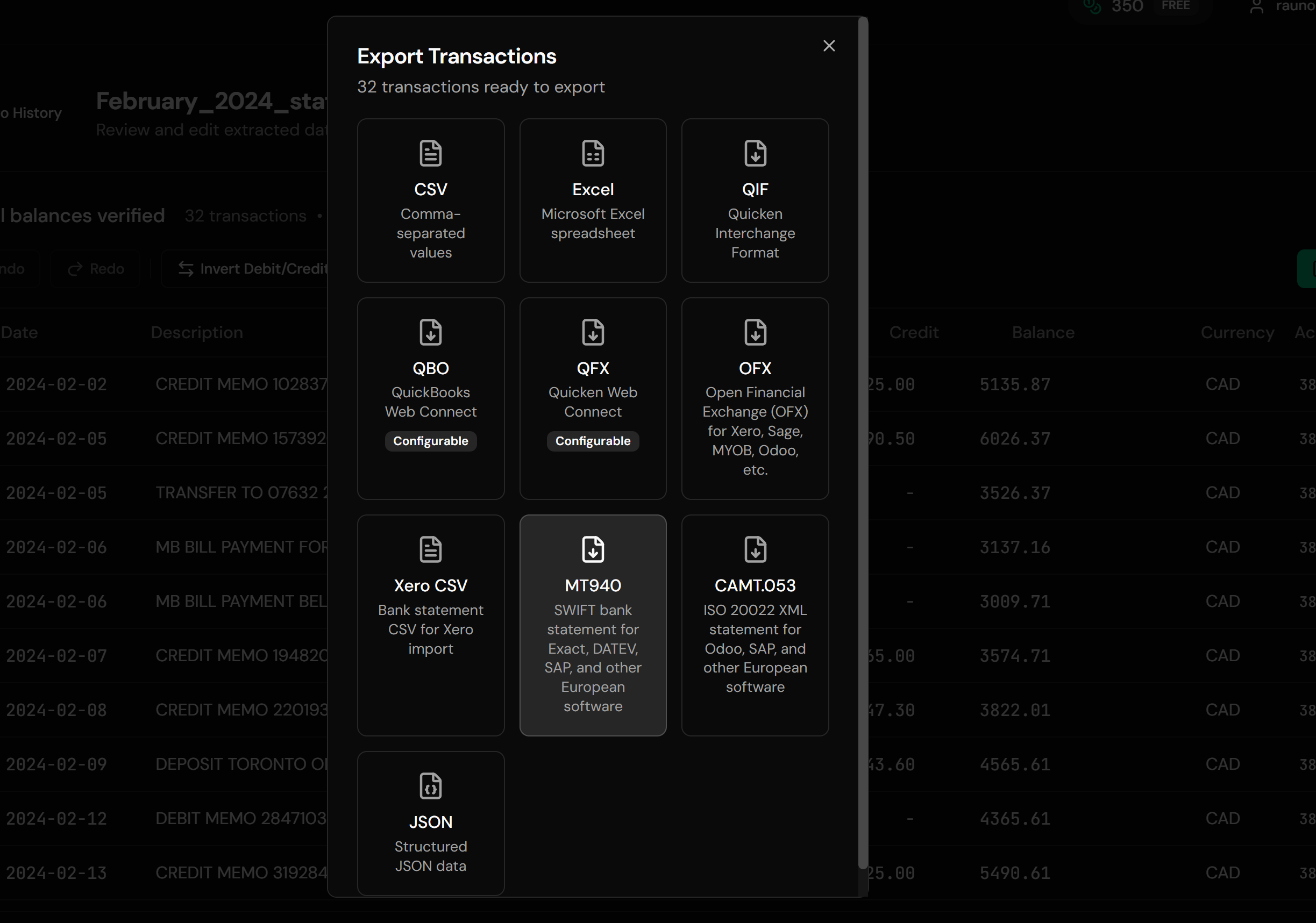
Check extracted transactions in an interactive preview before export
Download MT940
Get a valid SWIFT statement file for your software
The output follows the SWIFT MT940 specification, and the opening balance plus entries always reconciles exactly to the closing balance, which is the check importers actually enforce.
How to Import the MT940 File Into Your Software
Exact Online:
- Go to the Financial module and open bank statement import
- Upload the .sta file from Ledger Tome
- Match the statement to the correct administration and bank account
- Process the imported statement lines as usual
Twinfield:
- Open the bank statements function
- Import the MT940 file and select the target bank account
- Post the imported statement lines
SnelStart, Moneybird, e-Boekhouden, Yuki, AFAS, SAP, and most European ERPs accept the same file through their own bank statement import.
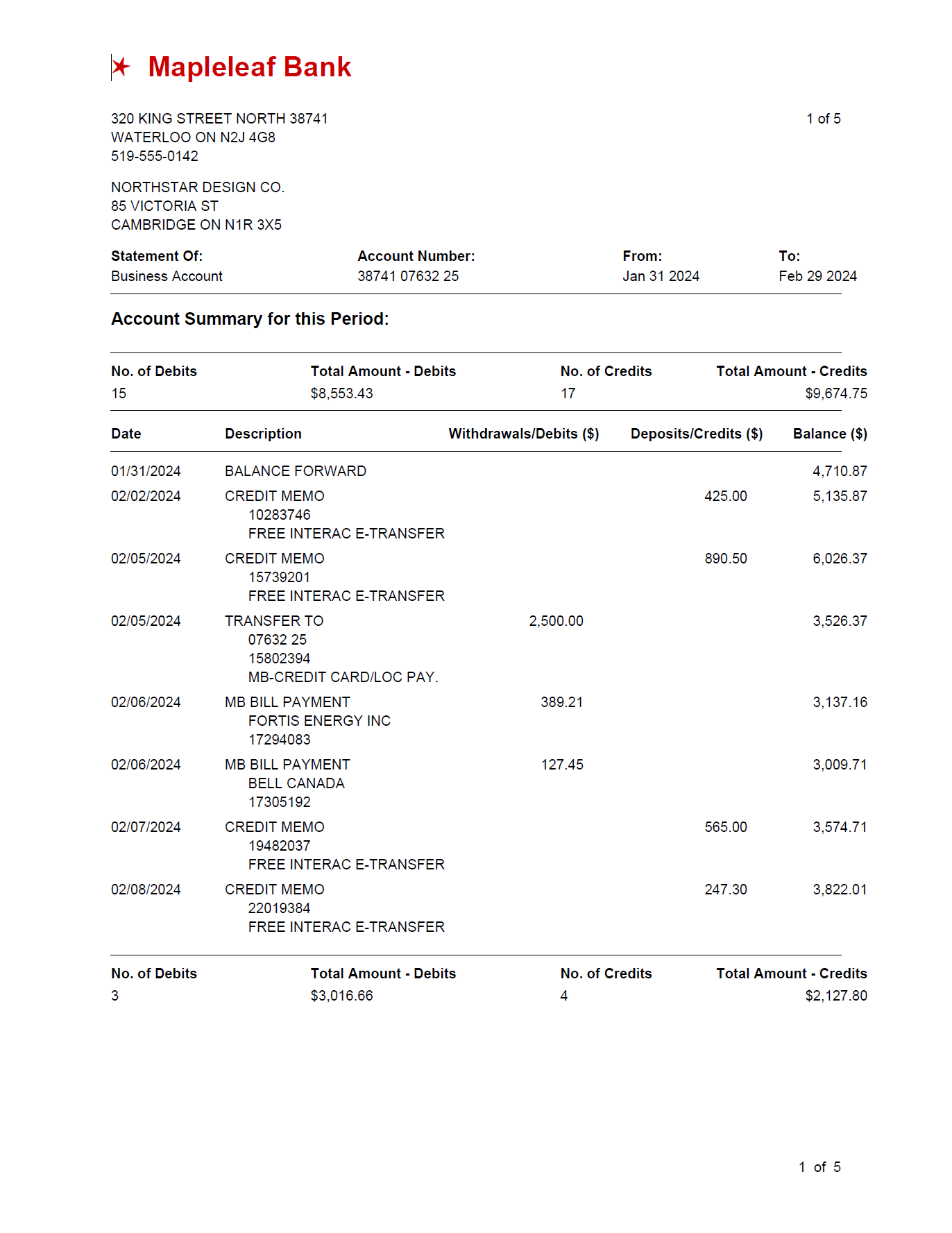
From PDF Statement to Valid MT940
Before: Raw PDF
After: Valid MT940
Use Cases for PDF to MT940 Conversion
Foreign Bank Accounts
A client banks abroad; the software wants MT940; the foreign bank offers PDF. The most common trigger.
Payment Provider Statements
PSP and platform payout statements delivered as PDF, converted for the accounting import.
Catch-Up Administration
Months of statements beyond the bank's MT940 export window, imported in a batch.
Closed Accounts
Wrapping up an administration when the bank connection is gone and PDFs are all that remain.
Accounting Firms
Converting statements from whatever bank each client uses into the one format the firm's software imports.
ERP and Treasury
Feeding SAP and other ERP systems that reconcile against MT940 statements.
Who PDF to MT940 Conversion Is For
This type of conversion is commonly used by:
Exact Online Users
The NL accounting standard, fed by MT940 imports.
Twinfield Users
Dutch accounting firms processing client statements in batch.
SnelStart, Moneybird & e-Boekhouden Users
The Dutch SMB stack, all MT940 importers.
German Accounting Users
Software in the DE stack that accepts MT940 alongside CAMT.
Accountants & Administratiekantoren
Firms normalizing many client banks into one import format.
ERP & Treasury Teams
SAP and other systems reconciling on SWIFT statements.
MT940 vs CAMT.053
CAMT.053 is the ISO 20022 XML successor to MT940, and European banking is migrating toward it. Most accounting software currently accepts both, and plenty of systems still only read MT940. Ledger Tome exports both formats, so you can match whatever your software version expects.
Related Converters
Ledger Tome supports multiple output formats. Choose the one that fits your workflow:
Using Xero, Sage, or QuickBooks Online? OFX is their preferred import.
Need readable data instead of an import file?
Going the other direction: make an MT940 file readable.
Universal spreadsheet output.
Working from a CSV export toward OFX software?
What Ledger Tome Does Not Do
For clarity and transparency, Ledger Tome does not:
- Access bank accounts directly
- Initiate or modify transactions
- File taxes or submit reports
- Replace accounting software
- Categorize transactions automatically
It focuses solely on converting PDF statement data into structured, accounting-ready formats.
Security & Privacy
Your Financial Data is Protected
We take statement security seriously. Here's how we protect your data:
-
Encrypted Transmission
All uploads use 256-bit SSL encryption (the same security banks use)
-
Secure Processing
Files are processed in isolated, secure environments with no human access
-
Automatic Deletion
All uploaded files are permanently deleted after 7 days (or immediately upon request)
-
No Training Data
Your statements are never used to train AI models or shared with third parties
-
No Account Access
We never access your bank account directly or store your banking credentials
-
GDPR Compliant
Full compliance with data protection regulations
-
No Permanent Storage
We don't maintain a database of your financial information
Privacy First: We process your data solely for conversion purposes. No marketing, no data selling, no third-party sharing.
Frequently Asked Questions
Can I convert any PDF bank statement to MT940?
Will the balances in the MT940 file reconcile?
How do I import an MT940 file into Exact Online?
Can I convert scanned bank statements to MT940?
Does this work with foreign bank statements?
What file extension does the MT940 file use?
Can I convert old statements?
Which software imports MT940 files?
What about CAMT.053?
Can I review the data before downloading the MT940 file?
How much does it cost?
Troubleshooting Common Issues
Import rejects the file
Re-download and try again; if your software expects a specific extension (.940 or .mt940 rather than the .sta Ledger Tome produces), rename the file to match, the content is identical.
Scanned statement with poor quality
OCR handles most scans; for best results use at least 300 DPI with clearly readable text.
Wrong currency shown
Currency comes from the statement itself. Check the preview and correct the metadata before export if the statement is unusual.
Statement includes non-transaction pages
Upload the full PDF. The converter extracts only transaction data and ignores marketing pages and disclaimers.
Software wants CAMT.053 instead
Export CAMT.053 from the same preview; both formats are available at the export step.
Summary
MT940 is the format European accounting software actually imports, and PDF is what banks hand you the moment an account is foreign, closed, third-party, or simply old. Hand-assembled MT940 files fail on structure and balance checks, while automated conversion produces valid SWIFT statements whose balances reconcile by construction.
If you have PDF statements that need to import like bank-delivered MT940, Ledger Tome converts them in minutes.
Ready to Convert Your PDF to MT940?
Stop typing statement lines into your administration. Convert your first PDF statement to MT940 in minutes.
Used by accounting firms, administratiekantoren, and finance teams