Someone sent you an .sta file, or your bank's export produced one, and double-clicking it got you a wall of text: :61: lines, :86: lines, cryptic codes. MT940 is a SWIFT format built for machines, and no spreadsheet program opens it properly. Our converter reads the file and gives you clean Excel or CSV: one row per transaction, with dates, descriptions, amounts, and running balances in columns.
The reliability part matters more than it looks. MT940 files state their own opening and closing balances, and Ledger Tome checks its output against them: running balances are reconstructed from the statement's opening balance, and if the numbers don't land exactly on the stated closing balance, you get a warning instead of a spreadsheet with silently wrong balances.
This page explains what's inside an MT940 file, why it's unreadable by design, and how to get analysis-ready data out of it.
Why You Can't Just Open an MT940 File
MT940 is an interbank message format. Everything about it resists casual reading:
Tag soup instead of columns
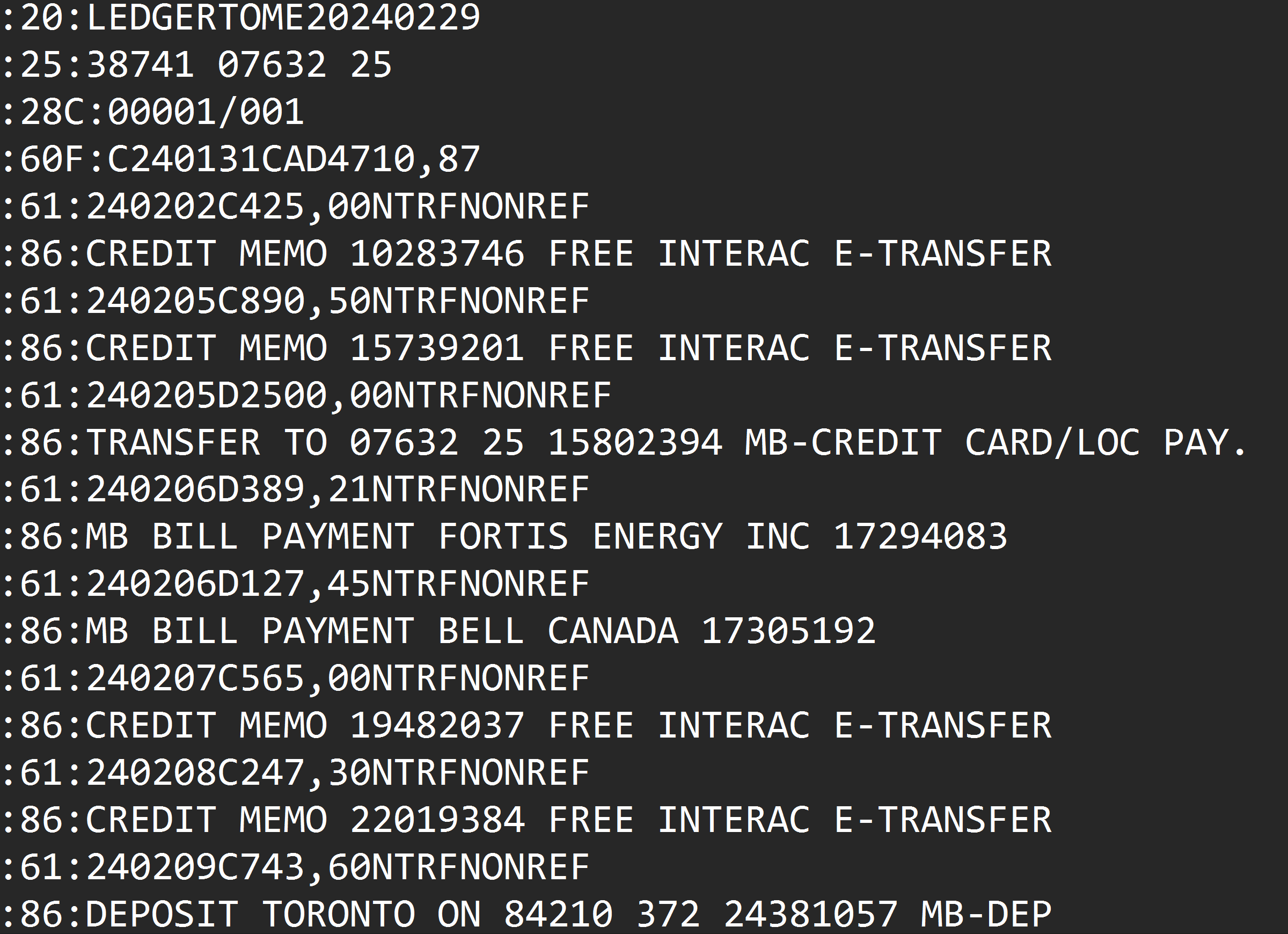
Transactions live in :61: lines with dates, amounts, and codes concatenated into one string, and descriptions in separate :86: lines.
SWIFT conventions everywhere
Two-digit years, comma decimals, C/D marks instead of signs, and descriptions wrapped across continuation lines.
Excel mangles it
Opening the file as text gets you one column of tags; every "import wizard" attempt needs the format rules Excel doesn't know.
Balances are implicit per row
The file states opening and closing balances, but per-transaction running balances have to be computed, correctly, or your analysis starts from wrong numbers.
The data is complete and precise. It just was never meant for human eyes.
What Is an MT940 File?
MT940 is the SWIFT customer statement message: the format banks use to deliver end-of-day account statements to business customers and software.
You typically end up holding one because a bank's business portal exports it, an accountant or client forwarded it, or a system produced it as its statement format. The same content appears under different extensions: .sta, .940, and .mt940 are all the same format, and Ledger Tome accepts all of them.
What's inside an MT940 file:
:20:STATEMENT20260115
:25:NL91ABNA0417164300
:28C:00001/001
:60F:C260101EUR1000,00
:61:260115D4,50NTRFNONREF
:86:COFFEE SHOP AMSTERDAM
:61:260116C900,00NTRFNONREF
:86:CLIENT PAYMENT INV 2026-014
:62F:C260116EUR1895,50
Going the other direction, from PDF statements into MT940 for your accounting software? See our PDF to MT940 converter .
Common Ways to Read an MT940 File
Open It in a Text Editor
Works for confirming what the file is. Analysis, filtering, and totals are out of the question.
Excel Text Import Wizard
Splitting on colons gets you fragments, not transactions. Dates, amounts, and descriptions still need SWIFT-aware parsing you'd be doing by hand.
Ask the Sender for a Different Format
Sometimes possible, often not: the MT940 is what the bank or system produces, and the sender has no better export.
Automated MT940 Conversion
Parses the SWIFT structure natively, joins wrapped descriptions, computes running balances, and verifies them against the statement's own closing balance. Free to start.
MT940 to Excel: Method Comparison
| Method | Time Required | Accuracy | Best For | Cost |
|---|---|---|---|---|
| Text editor | Instant | Read-only squinting | Confirming file contents | Free |
| Excel import wizard | 30-60 minutes per file | Fragile, manual | One-off, simple files | Free |
| Ask for another format | Days, maybe | Depends | When the sender has options | Free |
| Ledger Tome | Under a minute | Balance-verified | Any MT940, any source | Free to start |
Why automated conversion wins: SWIFT parsing rules are exactly the kind of thing software should know so you don't have to.
How Ledger Tome Converts MT940 to Excel
Ledger Tome parses SWIFT MT940 statement files natively and turns them into clean spreadsheets.
Upload
Upload your .sta, .940, or .mt940 file
Native Parsing
SWIFT tags, dates, amounts, and wrapped descriptions decoded automatically
Balance Check
Running balances reconstructed from the statement's opening balance and verified against its closing balance
Download Excel or CSV
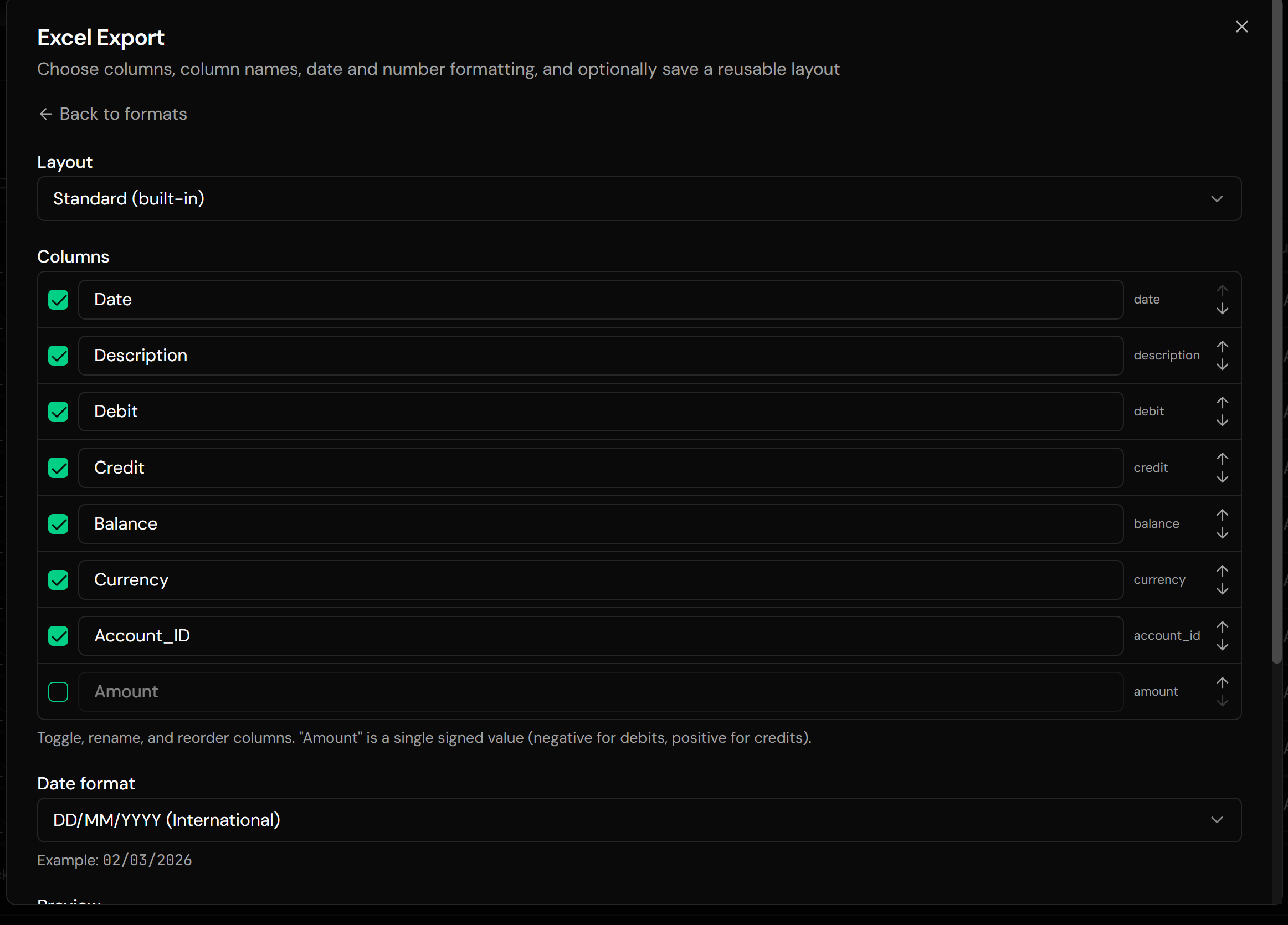
One row per transaction, ready for analysis
If the reconstructed balances don't land exactly on the statement's stated closing balance, Ledger Tome warns you rather than showing numbers that look right and aren't.
From SWIFT Tags to a Clean Spreadsheet
Before: Raw MT940
After: Spreadsheet columns
Use Cases for MT940 to Excel Conversion
Analyzing Business Account Activity
Filter, pivot, and total transactions that were locked in SWIFT format.
Audit and Workpapers
Turn statement files into readable schedules with verified balances.
Client Sent an .sta File
Bookkeepers receiving whatever export the client's bank portal produced.
Treasury Reviews
Reading multi-account MT940 deliveries without an ERP in the loop.
Migrating Historical Data
Statement archives in MT940, needed as spreadsheets for a new system or analysis.
Just Opening the File
Sometimes you only need to see what's in it. That counts too.
Who MT940 to Excel Conversion Is For
This type of conversion is commonly used by:
Bookkeepers & Accountants
Reading client statement files without SWIFT knowledge.
Financial Analysts
Getting bank activity into Excel where the actual work happens.
Treasury & Finance Teams
Reviewing statement deliveries outside the ERP.
Auditors
Independent, balance-verified transaction listings from source files.
Developers & Consultants
Inspecting MT940 deliveries during integrations, without writing a parser.
Anyone Handed an .sta File
If you didn't choose the format, you shouldn't need to learn it.
Related Converters
Ledger Tome supports multiple input and output formats. Choose the one that fits your workflow:
The other direction: PDF statements into SWIFT format for accounting imports.
PDF statements into Excel.
PDF statements into CSV.
Spreadsheet data into accounting-software imports.
PDF statements into OFX for Xero, Sage, and others.
What Ledger Tome Does Not Do
For clarity and transparency, Ledger Tome does not:
- Access bank accounts directly
- Initiate or modify transactions
- File taxes or submit reports
- Replace accounting software
- Categorize transactions automatically
It focuses solely on converting statement data into structured, readable formats.
Security & Privacy
Your Financial Data is Protected
We take statement security seriously. Here's how we protect your data:
-
Encrypted Transmission
All uploads use 256-bit SSL encryption (the same security banks use)
-
Secure Processing
Files are processed in isolated, secure environments with no human access
-
Automatic Deletion
All uploaded files are permanently deleted after 7 days (or immediately upon request)
-
No Training Data
Your statements are never used to train AI models or shared with third parties
-
No Account Access
We never access your bank account directly or store your banking credentials
-
GDPR Compliant
Full compliance with data protection regulations
-
No Permanent Storage
We don't maintain a database of your financial information
Privacy First: We process your data solely for conversion purposes. No marketing, no data selling, no third-party sharing.
Frequently Asked Questions
How do I open an MT940 file?
What is an .sta file?
Can I get CSV instead of Excel?
Are the balances in the output reliable?
What columns does the Excel file contain?
My file has long descriptions split across lines. Will they survive?
Does this work with MT940 files from any bank?
Can I edit the data before downloading?
Can I convert the MT940 into an accounting import format instead?
How much does it cost?
Troubleshooting Common Issues
A balance warning appeared
The statement's entries don't add up to its stated closing balance, which happens with truncated or hand-edited files. The transactions are still parsed; only the running balances are withheld. Check whether the source file is complete.
File isn't recognized
Confirm it's actually MT940: it should contain :20:, :60F:, and :61: tags near the top. Renamed exports from other systems sometimes aren't MT940 at all. If the download arrived without a file extension, add .sta before uploading.
Strange characters in descriptions
SWIFT files use a restricted character set; the parser preserves what the bank encoded. What you see is what the file contains.
Dates look shifted
MT940 uses two-digit years and value dates. The parser decodes them per the SWIFT rules; check the preview against a known transaction if something looks off.
Need the data in accounting software, not Excel
Export OFX or QBO from the same preview instead, or see the related converters below.
Summary
MT940 files carry complete, precise statement data in a format only machines enjoy. Text editors show tags, Excel's import wizard shows fragments, and hand-parsing risks exactly the balance errors that make financial data worthless. Automated conversion decodes the SWIFT structure natively and proves its own output: balances reconstructed from the statement and verified against it.
If you have an .sta or MT940 file you need to actually read, Ledger Tome converts it in under a minute.
Ready to Read Your MT940 File?
Stop squinting at SWIFT tags. Convert your first MT940 file to Excel in minutes.
Used by bookkeepers, analysts, auditors, and treasury teams